Catering Calculator
Enter the guest count and, for each item, the servings per guest and your cost per serving; you get servings to prepare, food cost, the price per guest for your target food cost and the staff needed.
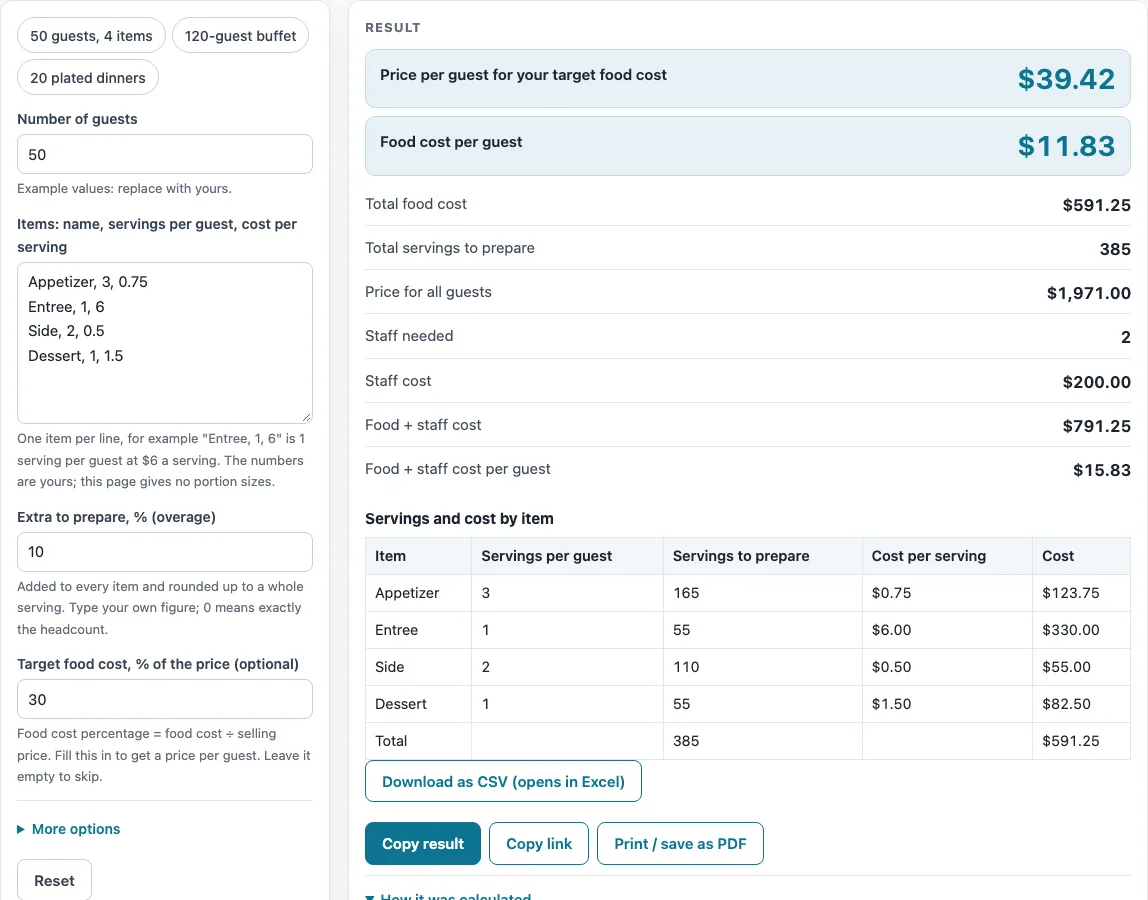
How to use the Catering Calculator
- Enter the number of guests as a whole number, such as 50.
- In the items box, type one item per line in this format: name, servings per guest, cost per serving in dollars. For example: Appetizer, 3, 0.75
- Enter the extra to prepare (overage) as a percentage. The example uses 10%. A warning appears if you set it to 0.
- Optionally, enter a target food cost %. Leave it blank if you only want the food cost totals.
- Open “More options” if you want staffing included. Enter guests per staff member, hours each staff member works, and staff cost per hour.
- Check the table. Each row shows servings per guest, servings to prepare, cost per serving and cost. A total row sits at the bottom.
- Read the results: total food cost, food cost per guest, price per guest at your target, staff needed, staff cost, and food plus staff per guest.
- Select the CSV button to download the table.
- Replace the example values with your own portion counts and costs. Errors appear if the guest count is not a whole number, an item line is malformed, the target is 0, or the overage is above 200%.
The presets (“50 guests, 4 items”, “120-guest buffet” and “20 plated dinners”) give you starting examples to change.
How does a catering calculator work out how many servings to prepare?
The tool multiplies guests by servings per guest, adds the extra to prepare, and rounds up to a whole serving. The servings for each item equal guests x servings per guest x (1 + overage %), rounded up, and the item cost equals those servings x cost per serving.
Take 50 guests with a 10% overage. Appetizer at 3 servings per guest gives 50 x 3 x 1.10 = 165 servings. Entree at 1 gives 55, Side at 2 gives 110, and Dessert at 1 gives 55, for 385 servings in all. At $0.75, $6, $0.50 and $1.50 per serving, those items cost $123.75, $330.00, $55.00 and $82.50. The total food cost is the sum of these, which is $591.25.
Food cost per guest is the total food cost divided by the number of guests. For this example, $591.25 / 50 gives $11.83 per guest.
How is the price per guest worked out from a target food cost?
Food cost percentage means food cost divided by the selling price. To find a selling price for a target, the tool divides food cost per guest by the target as a decimal, then rounds up to the next cent. The formula is price per guest = food cost per guest / (target % / 100).
For the same 50-guest example with a 30% target, $591.25 / 50 = $11.825 is divided by 0.30. That gives $39.4167, which rounds up to $39.42 per guest. For all 50 guests, that is $1,971.00.
A second example shows the same steps. With 120 guests and a 5% overage, a Buffet entree at 1.5 servings per guest and $5 each gives 189 servings. A Salad at 1 serving per guest and $1.20 gives 126 servings, and Rolls at 2 per guest and $0.30 give 252 servings. The food cost is $1,171.80, which is $9.77 per guest. At a 35% target, that becomes $27.90 per guest.
How do staff costs fit into the catering numbers?
Staff needed equals guests divided by guests per staff member, rounded up. Staff cost equals the number of staff x hours each x cost per hour. Staff cost is separate from food cost, so it does not change the servings or the food cost total.
With 25 guests per staff member, 5 hours each and $20 an hour, 50 guests need 2 staff. That costs 2 x 5 x $20 = $200.00. Adding this to the $591.25 food cost gives $791.25, or $15.83 per guest.
The tool also shows food plus staff cost, in total and per guest. Every number depends on the portion counts and costs you enter, so check those values before you rely on the totals.
Sources (checked 15 October 2026): online.jwu.edu
Worked examples
| Input | Result |
|---|---|
| 50 guests, 4 items, 10% overage | Food $591.25, $11.83 per guest |
| 120 guests, 3 items, 5% overage | Food $1,171.80, $9.77 per guest |
| 20 guests, 1 items, 0% overage | Food $240.00, $12.00 per guest |
Calculated by the tool above; open it with the same values to see each step.
Frequently asked questions
Frequently asked questions
Does the calculator know standard portion sizes?
No. The page gives no portion sizes or weights, so every serving count and cost is one you type. The default values are examples to replace with your own.
Why are there more servings to prepare than guests?
The extra to prepare (overage) adds a percentage on top of the planned servings, and each item’s count is rounded up to a whole serving. A 10% overage on 50 guests at 3 servings each gives 165 servings to prepare.
What does the overage warning mean?
A warning appears when the overage is 0, which means no extra is added to the planned servings. Errors also appear for a guest count that is not a whole number, a malformed item line, a target of 0, or an overage above 200%.
Is the data I enter uploaded anywhere?
No. Everything runs in your browser, nothing is uploaded, there is no sign-up, and the tool is free.
Does this page calculate the food cost of individual menu items?
No. Menu-item food cost and recipe costing are not part of this page. The table covers only the items you list, using the cost per serving you enter.
Can I leave out the staff costs?
Yes. Leave the “Guests per staff member” field empty and the page skips staff. If you enter a ratio but leave hours or the cost per hour empty, it shows only the number of staff needed.
Related tools
- Restaurant Labor Cost Calculator: use it when you want to look at staff pay in more detail than the staffing inputs here.
- Pour Cost Calculator: use it when you need a cost percentage for drinks rather than food.
- Restaurant Budget Template: use it when you are planning costs beyond a single event.
- How Much Does It Cost to Open a Restaurant? Cost Worksheet: use it when you are estimating the costs of opening a new restaurant.
- Restaurant Costs: the hub page for all the cost worksheets and calculators on this site.
- How Much Does a Food Truck Cost? Startup Cost Worksheet: use it to add up your own food truck costs if you cater from a truck.
- Tip Pool Calculator: use it to split pooled tips from an event among staff.
- Restaurant Tip Calculator: use it to work out a tip and split a bill.