Cleaning and Sanitizing Log
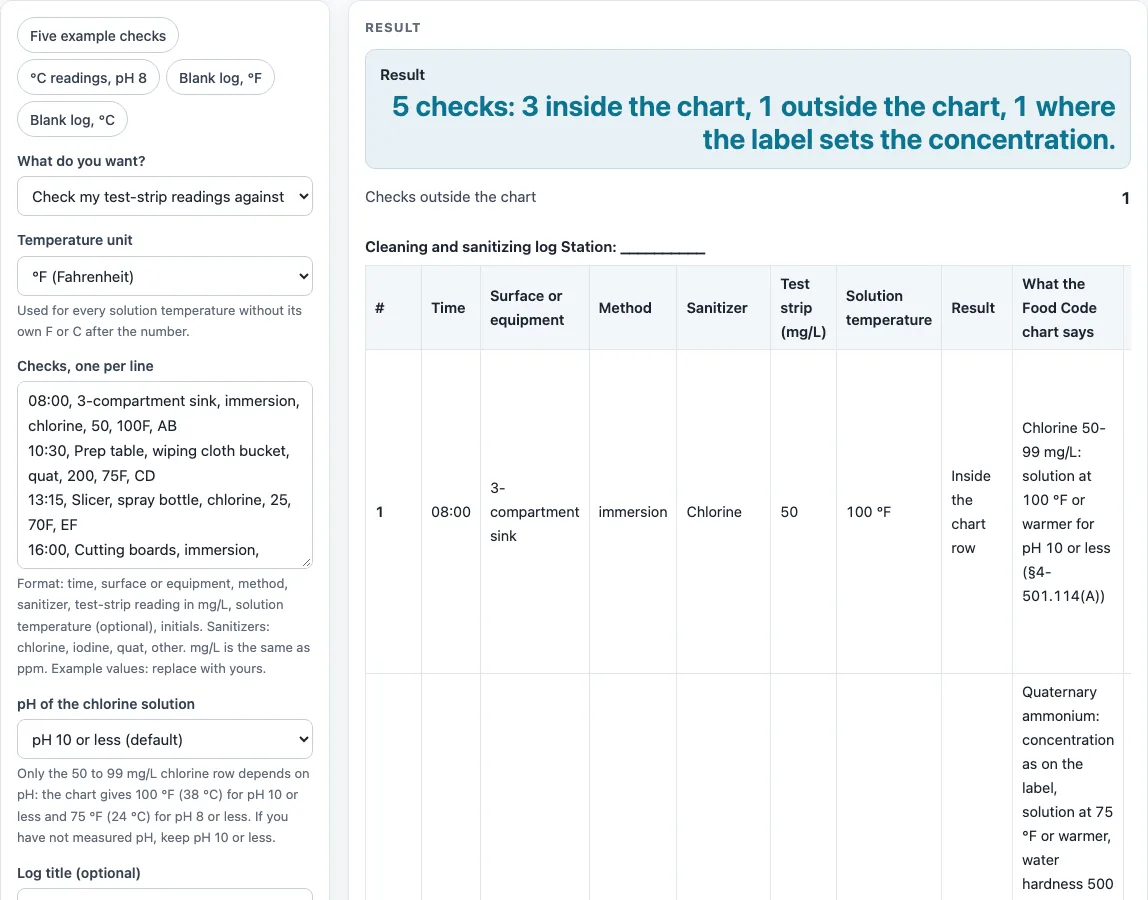
Type each sanitizer check (surface, method, chemical, test-strip reading, solution temperature) to see whether it is inside the Food Code chart, or print a blank log with the chart under it.
How to use the cleaning and sanitizing log
- Choose “Check my test-strip readings” to compare readings, or “Print a blank cleaning and sanitizing log” to get an empty sheet.
- In check mode, type one line per check, in this order: time, surface or equipment, method, sanitizer, test-strip reading in mg/L, solution temperature (optional), and initials.
- Name the sanitizer as chlorine, iodine, quat (quaternary ammonium) or other.
- Type the reading in mg/L. mg/L is the same as ppm, so a strip read in ppm gives the same number.
- If you use a decimal comma, such as 49,5, separate the line with ‘|’ so the page reads the number correctly.
- Type the solution temperature if you measured it. If you leave it out, only the concentration is checked and the row says so.
- For chlorine, pick the pH of your solution. The default is pH 10 or less, and only the 50 to 99 mg/L row depends on it.
- Read the result table. Each line shows “Inside the chart row”, “Outside the chart row” or “Check the label”, with what the chart says and the contact time. The Food Code sanitizer reference table is printed under it.
To make a paper copy, choose “Print a blank cleaning and sanitizing log” and set the number of rows from 1 to 60 (default 15). The sheet has columns for time, surface or equipment, method, sanitizer, test strip mg/L, solution temperature, in the chart Y/N, action if outside, and optional initials.
What does a cleaning and sanitizing log need to record?
A cleaning and sanitizing log records, for each check, the time, the surface or equipment, the method, the sanitizer, the test-strip reading in mg/L, the solution temperature if you measured it, and the initials of the person who checked. Together these show what was tested, when, and at what concentration. A sanitizer log is only as useful as its readings, so each line should come from an actual test.
The FDA Food Code requires the concentration to be determined with a test kit or other device used according to its label (§4-501.116). Contact times are 10 seconds for chlorine, or 7 seconds for 50 mg/L at the pH and temperature stated, and 30 seconds for other chemicals or as the label states (§4-703.11(C)). The table lists the contact time for each line.
How does the chart judge a chlorine reading?
Chlorine follows §4-501.114(A) of the FDA Food Code. A reading of 25 to 49 mg/L needs a solution at 120 °F (49 °C) or warmer. A reading of 50 to 99 mg/L needs 100 °F (38 °C) at pH 10 or less, or 75 °F (24 °C) at pH 8 or less. A reading of 100 mg/L needs 55 °F (13 °C). The pH setting chooses the column, and the default is pH 10 or less.
For example, chlorine at 50 mg/L and 100 °F is inside its row. Chlorine at 25 mg/L and 70 °F is outside, because the 25 to 49 mg/L row needs 120 °F.
What happens when a chlorine reading falls between rows or outside the chart?
A reading below 25 mg/L is outside the chart, because 25 mg/L is its lowest row. A reading between rows falls in the row below it, so 49.5 mg/L is checked against the 25 to 49 row. Above 100 mg/L the chart has no row, so the page tells you to follow the product label.
An “outside the chart row” result is a prompt to review the reading and the solution, not a final verdict.
Why do iodine, quat and other sanitizers get different checks?
Iodine follows §4-501.114(B): 12.5 to 25 mg/L inclusive, with a solution at 68 °F (20 °C) or warmer and pH 5.0 or less. The page does not check pH, so you need to check that yourself.
Quaternary ammonium (§4-501.114(C)) and other chemical sanitizers (§4-501.114(E)) set the concentration by the EPA-registered label, so the page shows “check the label”. Only the minimum solution temperature of 75 °F (24 °C) can be outside for these. Quats also need water hardness of 500 mg/L or less. Your local health department adopts its own edition of the code and may be stricter than the FDA Food Code 2026.
Sources (checked 15 October 2026): fda.gov · fda.gov · fda.gov
Worked examples
| Input | Result |
|---|---|
| 5 checks | 3 inside, 1 outside, 1 by label |
| 2 checks | 1 inside, 1 outside, 0 by label |
| 2 checks | 0 inside, 0 outside, 2 by label |
| blank log, 15 rows | 9 columns |
| blank log, 10 rows | 8 columns |
Calculated by the tool above; open it with the same values to see each step.
Frequently asked questions
Is a sanitizer log the same as a cleaning and sanitizing log?
Yes, both names describe the record of sanitizer checks. This page uses “cleaning and sanitizing log” for the sheet and the checks it contains. Each line records the time, surface, sanitizer and reading.
What does mg/L mean on a test strip?
mg/L stands for milligrams per liter. The Food Code defines it as the metric equivalent of parts per million, so 50 mg/L is the same as 50 ppm. Type the number from your strip into the check line.
Does an “inside” result mean my surface is sanitized?
No. The page compares a reading with the chart row you chose, and it never says a surface is sanitized. Your product label and your local health department decide what applies to your operation.
Who sets the final sanitizing limits for my kitchen?
The FDA Food Code sets the values on the chart, but your local health department adopts its own code edition and may be stricter. For quats and other chemicals, the product label sets the concentration and contact time.
Can I print a blank log without entering any readings?
Yes. Choose “Print a blank cleaning and sanitizing log”, then set the number of rows from 1 to 60; the default is 15. The sheet prints with its columns and the chart underneath.
Which sanitizers can the page check?
Chlorine, iodine, quat (quaternary ammonium) and other. Chlorine and iodine are compared with their chart rows. For quats and other chemicals the page shows “Check the label” because the label sets the concentration.
What if I do not type a solution temperature?
The row then checks only the concentration and says so. Type the temperature as well if you measured it.
Related tools
Corrective Action Form: use it to write down what you did when a check falls outside the expected result.
Food Safety Checklist: use it to review general food safety steps alongside your sanitizer checks.
Food Waste Log: use it to record discarded food and the reason it was thrown out.
Receiving Log: use it to record deliveries as they arrive at your site.
Restaurant Cleaning Checklist: use it to plan the cleaning tasks that the sanitizing checks follow.
Restaurant Inventory Template: use it to count stock on hand against what you have ordered.
Restaurant Opening Checklist: use it to run through the set-up steps before service begins.
Kitchen Checklists and Logs: see all the checklists and logs on this site in one place.