Cold Chain Monitoring: Logger CSV to Printable Report
Load a data-logger CSV or paste readings, type the allowed range, and get the lowest, highest and average, each excursion and the mean kinetic temperature in a printable temperature record report. The file stays in your browser.
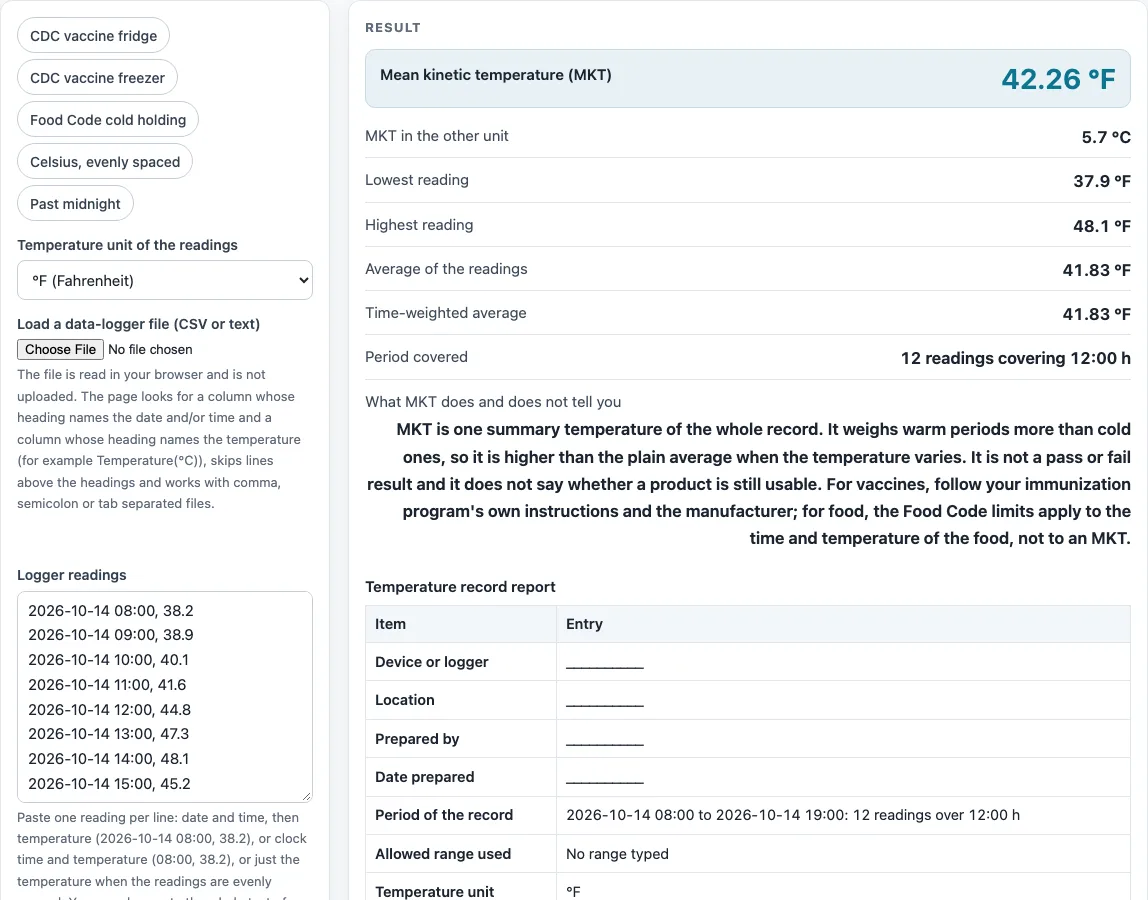
How to use the Cold Chain Monitoring Tool
- Choose the unit (°C or °F) on the page.
- Paste readings into the box, one per line. Use “date time, temperature” (such as 2026-10-14 08:00, 38.2), “clock time, temperature” (such as 08:00, 38.2), or a temperature alone for evenly spaced readings. For temperature-only lines, set the minutes between readings under “More options”. You need at least 2 and no more than 20,000 readings.
- Or paste a whole data-logger export; the page finds the time and temperature columns itself.
- Or load a file with the file button. Files over 20 MB are refused.
- Read any warnings above the results. They tell you if a unit was converted, if a row was skipped, or if the date order was assumed.
- If dates such as 03/04/2026 could be read two ways, check “Order of day and month” under “More options” and switch it if needed.
- Type your lowest and/or highest allowed temperature; nothing is assumed. You can also use the buttons that fill the CDC vaccine refrigerator 36-46 °F range, the freezer -58 to 5 °F range, or the FDA Food Code cold-holding limit of 41 °F.
- Review the summary, the excursion table and the MKT result.
- Type the device or logger name, location and preparer (all optional). The printed report also has blank lines for date prepared, notes, reviewer, signature and date.
When the report is ready, select “Print” to print it, or use the CSV button to download all report blocks as one file called cold-chain-report.csv.
What is cold chain monitoring?
Cold chain monitoring is the regular checking of temperature readings from a logger to show that a product stayed inside its required range. The record matters as much as the reading, because it shows what happened between checks, not only at one moment.
What does mean kinetic temperature (MKT) tell you?
MKT is a single temperature that summarises the effect of changing temperatures over a period. It is calculated with the Haynes formula, MKT = (ΔH/R) / -ln( Σ t·e^(-ΔH/(R·T)) / Σ t ), using kelvin temperatures. The default ΔH is 83.144 kJ/mol and R is 0.0083144 kJ/(mol·K), so ΔH/R is 10,000 K. These defaults are cited to a logger-software help page and to an open-access BMC Public Health paper that cites USP <1079>. The USP chapter itself is behind a subscriber login. As a check, evenly spaced readings of 12.3, 15.9, 16.2, 14.7 and 14.9 °C give an MKT of 14.90 °C, which matches the 14.9 °C on that help page.
MKT is a summary, not a pass or fail result. It does not say whether a product is still usable.
How is time outside the range counted?
Each reading counts for the time until the next reading, and the last reading counts for the same interval as the one before it. An excursion is a run of consecutive readings outside the range in the same direction. A reading exactly on a limit is inside the range. For example, hourly readings of 40, 44, 47, 48, 45, 38, 50 and 41 °F against a 36-46 °F range give 2 excursions and 3:00 h outside the range out of 8:00 h, which is 37.5%. The longest excursion is 2:00 h.
How does the tool read a logger export?
For a file, the page looks for a heading that contains date, time or stamp for the time column, and a heading that contains temp, °C, °F or similar for the temperature column. Humidity, dew point and battery columns are not used. The delimiter (comma, semicolon or tab) is detected from the lines, and a decimal comma such as 38,2 is handled. If the file gives a unit that differs from the unit you chose, the readings are converted and a warning is shown. The file is read in your browser and is not uploaded, and files over 20 MB are refused. Unreadable rows are skipped and counted in a warning.
Food safety limits are the limits stated by the FDA Food Code or by USDA guidance. Your local health department adopts its own edition of the code and may be stricter, so check with it before relying on a limit.
Sources (checked 15 October 2026): en.wikipedia.org · logger-software help page · pmc.ncbi.nlm.nih.gov · cdc.gov · fda.gov · fda.gov
Worked examples
| Input | Result |
|---|---|
| 12 readings covering 12:00 h | MKT 42.3 °F; readings from 37.9 to 48.1 |
| 12 readings covering 12:00 h | MKT 42.3 °F; readings from 37.9 to 48.1 |
| 12 readings covering 12:00 h | MKT 42.3 °F; readings from 37.9 to 48.1 |
| 8 readings covering 4:00 h | MKT 6.3 °C; readings from 4.1 to 9.4 |
| 3 readings covering 9:00 h | MKT 14.7 °C; readings from 5 to 20 |
| 4 readings covering 4:00 h | MKT 6.6 °C; readings from 4.1 to 9.8 |
Calculated by the tool above; open it with the same values to see each step.
Frequently asked questions
Is this a mean kinetic temperature calculator?
Yes, the tool calculates MKT from your readings, using the default ΔH and R values shown in the report. It also gives the other summary figures in the same run.
Is cold chain monitoring the same as cold chain management?
This tool covers the monitoring side: it summarises logged readings, excursions and MKT. It does not manage storage or transport, so keep your own procedures for those.
Are my readings uploaded anywhere?
No. Everything runs in your browser. Loaded files are read on your device with FileReader and are not uploaded.
Why does my file show a warning about the date order?
A date such as 03/04/2026 is read month first unless a day above 12 shows the order or dots are used. The page then warns that the order was assumed. Switch “Order of day and month” under “More options” if your dates are day first.
Can I use this for vaccine storage?
You can use it to summarise vaccine storage readings. Vaccine users should follow their immunization program and the manufacturer’s guidance for what to do with any excursion.
Does a result rule on my food?
No. The page does not rule on food or on any inspection. Food Code limits apply to the time and temperature of the food itself, not to an MKT value, so confirm your results with your local health department.
Related tools
Food Temperatures, Holding and Cooling: use it to see every food temperature page on this site in one place.
Food Danger Zone Time Calculator: use it to work out how long food spends in the danger zone.
Food Temperature Log: use it to record food temperatures by hand.
Hot Holding Temperature Checker: use it to check hot food held at serving temperature.
How Long Can Food Sit Out?: use it to estimate how long food can stay at room temperature.
TCS Food List: use it to see which foods need time and temperature control.
Two-Stage Cooling Method Checker: use it to check cooling of cooked food in two stages.
Vaccine Temperature Log: use it to keep a running log of vaccine storage temperatures.
Walk-In Cooler and Freezer Temperature Log: use it to record daily readings for walk-in units.