Corrective Action Form
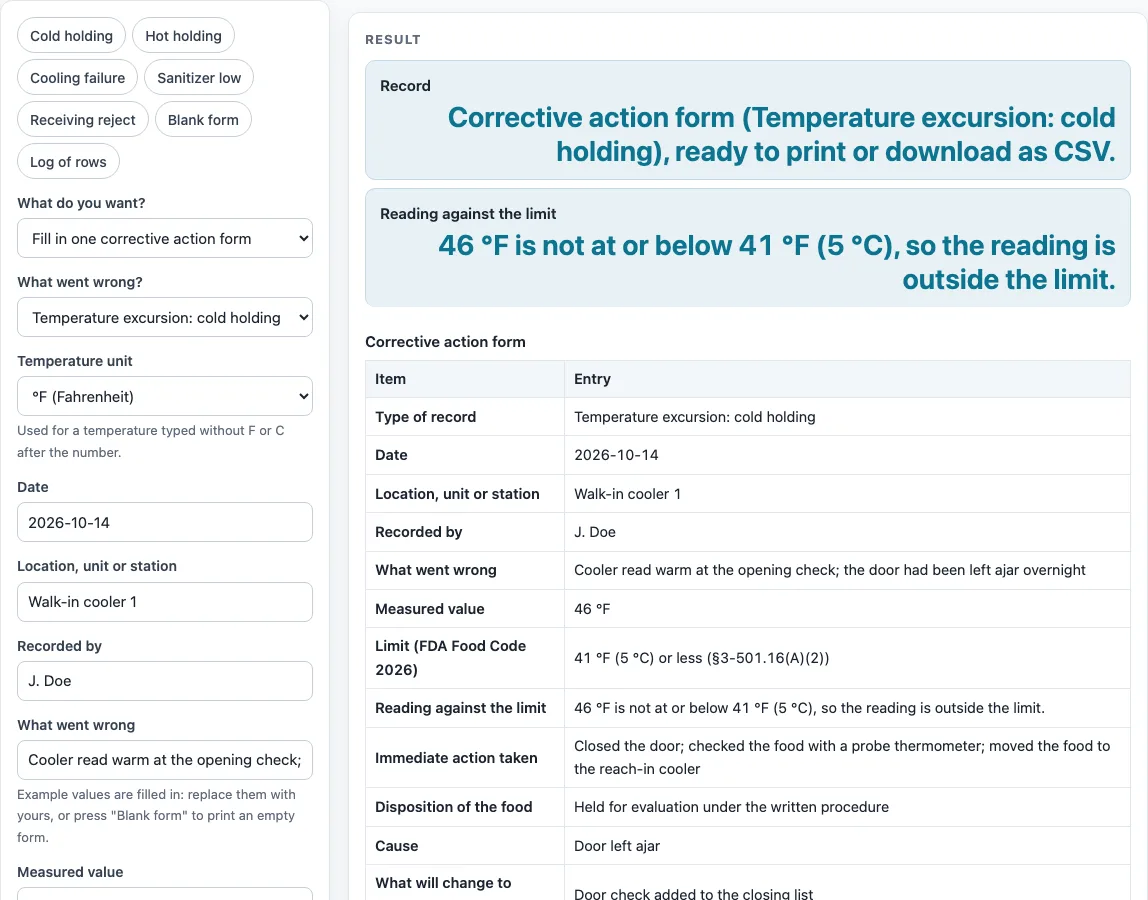
Pick what went wrong, enter the measured value and what you did, and get a corrective action record with the Food Code limit and the Food Code Annex wording beside it, ready to print or download as CSV.
How to use the Corrective Action Form
- Choose a mode: “Fill in one corrective action form” for one record, or “Keep a corrective action log” for a running list.
- In single-record mode, choose what went wrong: cold holding, hot holding, cooling failure, sanitizer too low, receiving, or a blank form.
- Press a starting-point button (cold holding, hot holding, cooling failure, sanitizer low, receiving reject) to fill example values, then replace them with your own.
- Enter the date, location or station, “recorded by”, what went wrong, and the measured value.
- For cold or hot holding, the page compares your reading with the limit and writes the result into the record. For a cooling failure, also enter the hours into cooling to see the Annex 5 guidance.
- Choose a disposition: no food affected, discarded, reheated, cooling started again with a different method, held for evaluation under the written procedure, or returned to the supplier.
- Type the immediate action taken, the cause, what will change to prevent it, and who verified it and when. The text fields take up to 500 characters.
- Print the record. Empty fields print as blank lines, so you can finish the form by hand. Press “Blank form” to clear every text field first.
- For a running list, switch to “Keep a corrective action log” and enter one row per line: date, what went wrong, measured value against the limit, action taken, disposition, cause, prevention, verified by. Up to 200 rows can be printed or downloaded as CSV.
What does a corrective action form record?
A corrective action form records one food safety problem, the measurement behind it, the action taken right away, and the change that will stop it happening again. Annex 4 of the Food Code states that discarding food is a corrective action and that records show corrective actions were taken.
The record includes the type, date, location or station, who recorded it, what went wrong, the measured value, the limit, the reading against the limit, the Annex 5 guidance for cooling, the immediate action, the disposition of the food, the cause, what will change, and who verified it and when.
How does the page check a cold or hot holding temperature?
The page compares the typed temperature with the limit stated by the FDA Food Code and writes the result into the record. Cold holding uses 41 °F (5 °C) or less (§3-501.16(A)(2)). Hot holding uses 135 °F (57 °C) or above (§3-501.16(A)(1)). Both limits include the boundary: 41 °F and 5 °C are within for cold holding, and 135 °F and 57 °C are within for hot holding. A reading of 46 °F against 41 °F (5 °C) or less gives “outside the limit”. That result describes the reading only.
What does the cooling guidance say for cooked hot food?
The typed temperature and the hours into cooling select the Annex 5 guidance. For cooked hot food, the text says the food may be reheated to 165 °F for 15 seconds and cooling started again with another method when it is above 70 °F and 2 hours or less into cooling, and above 41 °F and 6 hours or less into cooling. It should be discarded when it is above 70 °F and more than 2 hours into cooling, or above 41 °F and more than 6 hours into cooling. For example, stock at 80 °F one hour into cooling gives the reheat-and-restart guidance, and stock at 80 °F three hours in gives the discard guidance.
What about food prepared from ambient ingredients?
For ready-to-eat food prepared from ambient ingredients, the guidance says a more accelerated method may be used when the food is above 41 °F and less than 4 hours into cooling, and it should be discarded when above 41 °F and more than 4 hours into cooling. Exactly 4 hours is not covered by the guidance text, and the page says so. Check your written procedure or ask your local health department before you choose a disposition.
Who decides what happens to the food?
Your written procedure and your local health department decide. The page only records your choices. Your local health department adopts its own edition of the code and may be stricter than the limits shown here. Annex 5 is guidance written for regulatory inspectors, so the page labels it as what the Food Code Annex says, not as a rule for operators.
Sources (checked 15 October 2026): fda.gov · fda.gov
Worked examples
| Input | Result |
|---|---|
| Temperature excursion: cold holding | 46 °F is not at or below 41 °F (5 °C), so the reading is outside the limit. |
| Temperature excursion: hot holding | 128 °F is not at or above 135 °F (57 °C), so the reading is outside the limit. |
| Cooling failure | Food at 80 °F, 3 hours into cooling. |
| Cooling failure | Food at 9 °C, 2 hours into cooling. |
| Sanitizer too low | form ready to print |
| Receiving: delivery out of temperature or rejected | form ready to print |
| Other | form ready to print |
| log of 2 rows | printable table |
Calculated by the tool above; open it with the same values to see each step.
Frequently asked questions
Is this a corrective action log template?
It can work as one. The page has a single corrective action form for one event and a log mode that turns typed rows into a printable table with a CSV download.
Does the page tell me what to do with my food?
No. The page records and prints your entries and compares temperatures with the stated limits; the disposition is your choice. Actions come from your written procedure and your local health department.
Are my entries uploaded anywhere?
No. Everything runs in your browser and nothing is uploaded. There is no sign-up, and the tool is free.
Which limits does the form use?
It uses the limits stated by the FDA Food Code: cold holding at 41 °F (5 °C) or less, hot holding at 135 °F (57 °C) or above, the cooling limits, the chlorine, iodine and quaternary ammonium rows of §4-501.114, and the receiving limits of §3-202.11. Your local health department may use a different edition or stricter limits.
What if a cooling reading is exactly 4 hours into cooling?
The ambient-ingredient guidance does not cover exactly 4 hours, and the page says so. Check your written procedure or ask your local health department before you choose a disposition.
Can I print a blank paper form?
Yes. Press “Blank form” to clear every text field, then print. Empty fields print as blank lines.
How many rows can the log hold?
The log mode accepts up to 200 rows, one row per line.
Related tools
Cleaning and Sanitizing Log: use it to record cleaning and sanitizing tasks on a regular schedule.
Food Safety Checklist: use it to check everyday food safety tasks before or during service.
Food Waste Log: use it to record food that was thrown away and why.
Receiving Log: use it to record each delivery as it arrives.
Restaurant Cleaning Checklist: use it to list cleaning jobs for each area of the kitchen.
Restaurant Inventory Template: use it to count stock on hand.
Restaurant Opening Checklist: use it to confirm the opening tasks each day.
Kitchen Checklists and Logs: see all the checklists and logs on this site in one place.