Food Danger Zone Time Calculator
Add each stretch the food spent out of temperature control to see the total, the time left against the 2-hour or 4-hour limit, and what each source says to do.
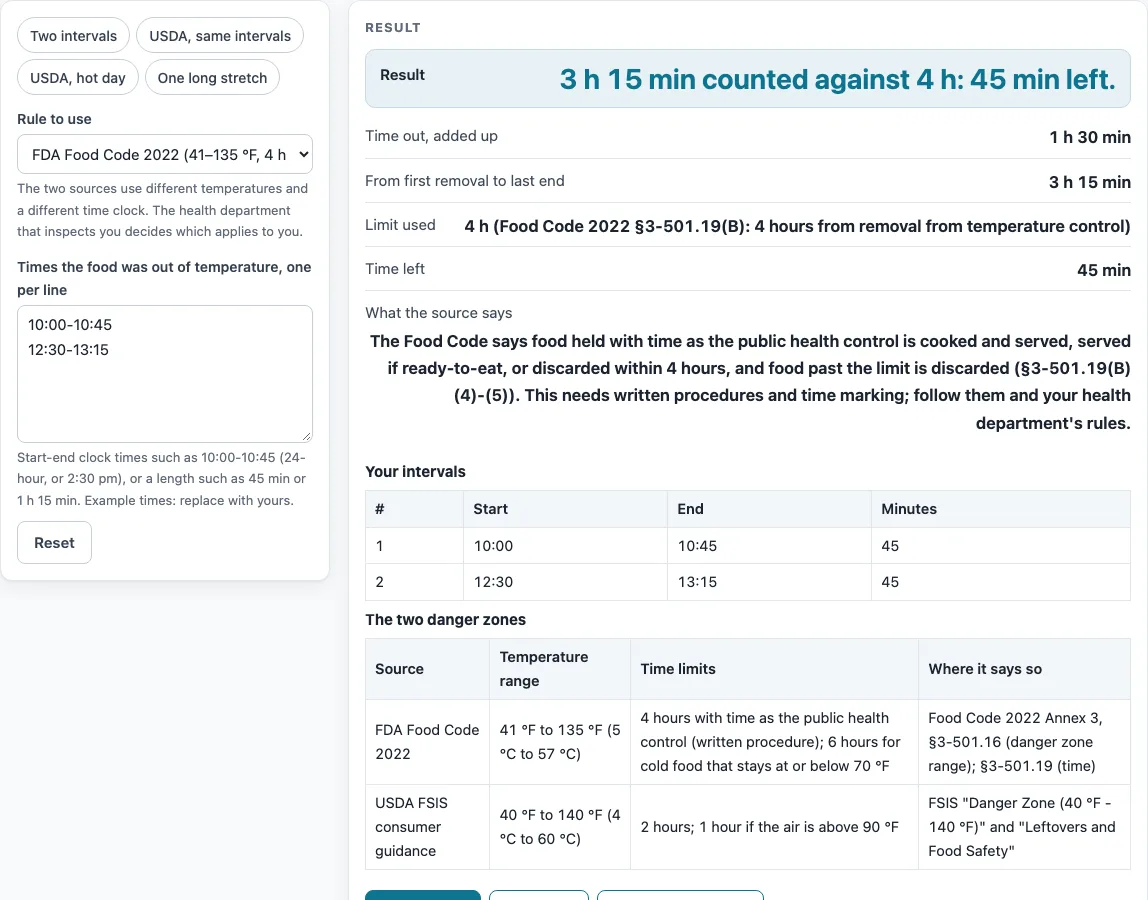
How to use the food danger zone tool
- Choose the rule to use: Food Code or USDA.
- If you chose USDA, set the air temperature: 90 °F or below, or above 90 °F. Above 90 °F the USDA limit drops from 2 hours to 1 hour.
- Type the times the food was out of temperature, one interval per line. Use clock times such as 10:00-10:45 or 2:30 pm to 3:15 pm.
- You can also type lengths such as 45 min or 1 h 15 min on a line.
- If every line has clock times, the tool also works out the time from the first removal to the end of the last interval, going past midnight when needed. Under the Food Code rule, if any line has only a length, the tool uses the total and shows a warning saying so.
- Check the warnings. A warning appears for more than 24 hours or for an interval with identical start and end times.
- Fix any errors. The tool reports an error for no lines, more than 40 lines, or a line that is neither a time range nor a length.
- Read the result. It shows “time left”, “the limit is reached with nothing left”, or “over the limit by …”, each with the source’s wording about discarding.
Everything is calculated in your browser, and nothing you type is uploaded.
What is the food danger zone?
The food danger zone is the temperature range between the cold holding limit and the hot holding limit. The FDA Food Code 2022 gives it as 41 °F to 135 °F (5 to 57 °C), in Annex 3 on §3-501.16, and its holding limits are 41 °F cold and 135 °F hot. USDA FSIS consumer guidance uses 40 °F to 140 °F (4 to 60 °C), under the heading “Danger Zone (40 °F - 140 °F)”.
The two ranges differ at both ends, so the rule you choose changes the answer. The USDA figures were read from search excerpts of the FSIS pages, which did not load for our check. Food held inside either range is at a temperature where bacteria can multiply, which is why both sources limit how long food may stay there. The comparison table on this page lists both ranges, their time limits, and the exact places where each source states them.
How do the Food Code and USDA time limits differ?
The two sources state their clocks differently, and this tool counts them as follows. For the Food Code, it counts the span from the first removal of food from temperature control against the 4-hour limit for time as the public health control (§3-501.19(B)). For USDA FSIS consumer guidance, it compares the total of all the intervals with 2 hours, or 1 hour when the air is above 90 °F.
Take two intervals, 10:00-10:45 and 12:30-13:15. Each lasts 45 minutes, so the total is 1 h 30 min. The time from the first removal to the last end is 3 h 15 min.
- Food Code: 3 h 15 min against 4 hours leaves 45 min.
- USDA, air at or below 90 °F: 1 h 30 min against 2 hours leaves 30 min.
- USDA, air above 90 °F: the limit is 1 hour, so the food is over by 30 min.
Two intervals of 45 min and 1 h 15 min add up to exactly 120 minutes. That reaches the USDA 2-hour limit with nothing left.
This page reads the Code’s clock as the span and FSIS’s clock as the total of intervals, and it states that reading on the page. Two options are listed in the comparison table but not calculated: the Food Code 6-hour option for cold food that stays at or below 70 °F, and the written-procedure and marking conditions. Check those directly in the source.
Sources (checked 15 October 2026): fda.gov · fsis.usda.gov · fsis.usda.gov
Worked examples
| Input | Result |
|---|---|
| 2 intervals, FDA Food Code 2022 | 1 h 30 min out; time left: 45 min |
| 2 intervals, USDA FSIS consumer guidance | 1 h 30 min out; time left: 30 min |
| 2 intervals, USDA FSIS consumer guidance | 1 h 30 min out; time left: Over by 30 min |
| 2 intervals, USDA FSIS consumer guidance | 2 h out; time left: 0 min |
| 2 intervals, FDA Food Code 2022 | 1 h 30 min out; time left: 1 h |
Calculated by the tool above; open it with the same values to see each step.
Frequently asked questions
What is the food danger zone temperature range?
The FDA Food Code 2022 gives 41 °F to 135 °F (5 to 57 °C). USDA FSIS consumer guidance gives 40 °F to 140 °F (4 to 60 °C). The rule you choose in the tool determines which range applies.
Why do the FDA and USDA ranges differ?
The sources set their limits separately, and the page states both ranges with their locations. The tool does not merge them, so each result follows only the rule you select.
Does “time left” mean the food can be eaten?
No. The tool shows the time left against the limit for the rule you chose, with that source’s wording about discarding. It does not decide whether food can be eaten.
What happens if I enter only lengths, such as 45 min?
The tool adds the lengths into a total and uses that total. Under the Food Code rule it also shows a warning that the span from the first removal could not be worked out, because that span needs clock times on every line. Under USDA the total is the figure used anyway.
Does the Food Code 6-hour option work in this tool?
No. The 6-hour option for cold food that stays at or below 70 °F is listed in the comparison table, but the tool does not calculate it.
Do I need an account to use it?
No. The tool is free, needs no sign-up, and runs in your browser.
Related tools
Food Temperatures, Holding and Cooling: use it to see every food temperature page on this site in one place.
Cold Chain Monitoring: Logger CSV to Printable Report: use it when you need to turn temperature logger data into a printable report.
Food Temperature Log: use it to keep a running record of food temperatures.
Hot Holding Temperature Checker: use it to check food kept hot against the hot holding limit.
How Long Can Food Sit Out?: use it to estimate how long food can stay at room temperature.
TCS Food List: use it to see which foods are time and temperature controlled for safety.
Two-Stage Cooling Method Checker: use it to check cooling progress for cooked food.
Vaccine Temperature Log: use it to record temperatures for vaccine storage.
Walk-In Cooler and Freezer Temperature Log: use it to log temperatures for walk-in coolers and freezers.