Food Waste Log
Print the blank log, or type the week's waste (item, quantity, unit cost, reason) to get the total value, the share of purchases and a split by reason.
A food waste log is a record of the food your kitchen throws away, including what it was, how much there was, what it cost, and why it was discarded. This free food waste log page prints a blank log and, from the entries you type, totals the waste for you. It runs in your browser with no sign-up, and nothing you type is stored or uploaded.
Use it to find which items and which reasons cost you the most, such as spoilage, overproduction, prep waste, plate waste, or expired stock. You can print the blank log as a waste log template and fill it in by hand during service, then type the same entries into the page to get the totals. Only the entries you type are counted, so you can use your own prices and purchase figures.
How to use the Food Waste Log
- Set the number of blank rows, from 1 to 60. The default is 15. A larger number is capped at 60 with a warning, and 0 gives an error.
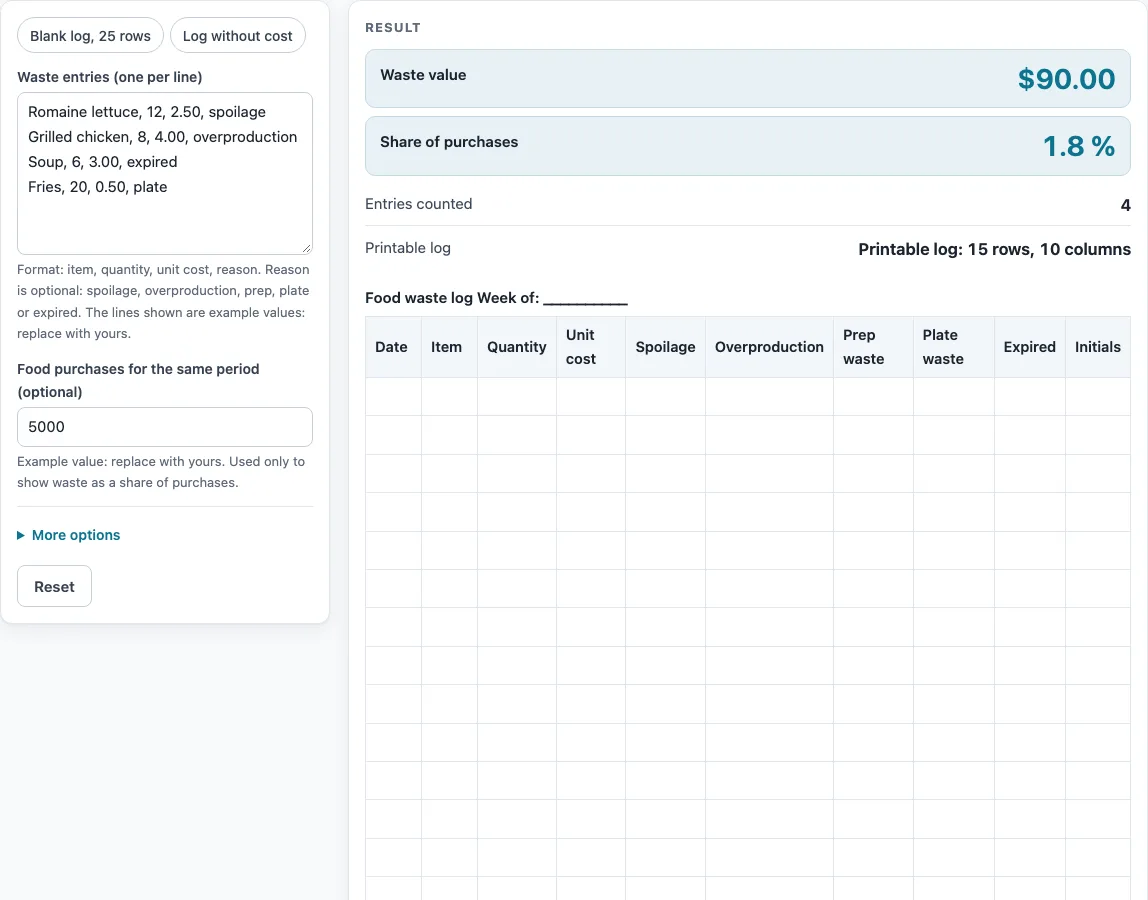
- Print the blank food waste log. It has the columns Date, Item, Quantity, an optional Unit cost, five reason columns (spoilage, overproduction, prep waste, plate waste, expired), and an optional Initials column.
- Fill in the printed log by hand if you want a paper record.
- Type your entries into the entries area, one per line, in this order: item, quantity, unit cost, reason. For example: lettuce, 12, 2.50, spoil. The reason is optional.
- Quantity must be above zero and unit cost zero or more. A line written another way gives an error that names its line number, so fix that line.
- Optionally, type your purchases figure. If it is empty, no percentage is shown.
- Read the results. The second table lists each entry with its value, and the third table splits the waste value by reason and shows each reason’s share of the total.
- If the waste is more than the purchases figure, a warning asks you to check both numbers.
The lines in the form and the purchases figure of 5,000 are example values: replace them with yours. To keep a copy, press the CSV button, which downloads all tables. Nothing is saved on the page, so download the CSV before you leave if you want to keep the results.
What is a food waste log?
A food waste log is a list of discarded food with a date, an item, a quantity, and a reason for each entry. Its purpose is to show where food is lost, so you can change ordering, prep, or serving habits. A log is most useful when it is kept consistently, because short gaps hide patterns.
How is the value of food waste calculated?
Each entry’s value is its quantity multiplied by its unit cost, rounded to the cent (half up). The total waste value is the sum of those cent values. For example, 12 units at 2.50 is 30.00, and 8 units at 4.00 is 32.00.
How is the share of purchases worked out?
The share of purchases is the waste value divided by the purchases figure, multiplied by 100. The result is shown to four significant figures. For example, a waste value of 29.25 against purchases of 1,200 gives 2.438 %. If the purchases figure is left empty, no percentage is shown, and zero or text in that field gives an error. A waste value larger than the purchases figure triggers a warning, because it usually means one of the two numbers was typed wrongly.
Why does the reason for waste matter?
Reasons show what kind of loss you are facing. Spoilage and expired stock point to ordering and storage. Overproduction points to how much you prepare. Prep waste comes from trimming and preparation, and plate waste comes from what guests leave behind. The reason is matched from its first letters: spoil, over, prep, plate, or expir. Anything else is counted as “Other”, so a reason that is not one of the five will still count in the total, but it will appear under “Other” instead of a named reason.
What should I do with the reason totals?
Start with the reason that has the largest share of the waste value. Then look at the items in that group, because the same few items often account for most of the loss. The reason table shows, for each reason, the number of entries, their value and the share of the total waste value. With the example lines, overproduction is 32.00 of a 90.00 total. Compare totals across weeks by keeping the CSV from each period. The page makes the numbers visible, but changing the process is up to you.
Sources: none needed; this page only does arithmetic on the numbers you type.
Worked examples
| Input | Result |
|---|---|
| 15 blank rows plus typed entries | Waste value $90.00 |
| 15 blank rows plus typed entries | Waste value $21.00 |
| 25 blank rows plus typed entries | Blank log with 25 rows |
| 15 blank rows plus typed entries | Waste value $29.25 |
Calculated by the tool above; open it with the same values to see each step.
Frequently asked questions
Is the food waste log data saved or uploaded?
No. Everything runs in your browser, and nothing is stored or uploaded. If you want a record, download the CSV before you close the page.
Why does my line show an error?
The line is not written in the required form. Quantity must be above zero, and unit cost must be zero or more. The error names the line number, so check that line for the order item, quantity, unit cost, reason.
Do I have to enter a reason for every entry?
No. The reason is optional. An entry without a reason is still counted in the total, and it appears under “Other” instead of one of the five named reasons.
What does “Other” mean in the reason table?
“Other” holds any reason whose first letters do not match spoil, over, prep, plate, or expir. Check your reason spelling if you expected a named reason.
Why do I see a warning about purchases?
The waste value is larger than the purchases figure you typed. Check both numbers, since a mistyped purchases figure is a common cause.
Can I use this as a waste log template?
Yes. Print the blank log to use by hand, then type the entries into the page when you want totals. The CSV button gives you a file with all the tables.
Related tools
Receiving Log: record deliveries when you need to check what arrived before it goes into storage.
Restaurant Inventory Template: track what you have on hand so you can compare stock with what you use and waste.
Food Safety Checklist: review routine food safety tasks alongside your waste records.
Corrective Action Form: document what you changed after a problem is found.
Cleaning and Sanitizing Log: keep a record of cleaning tasks for the same kitchen areas.
Restaurant Cleaning Checklist: list the cleaning jobs for each area of the kitchen.
Restaurant Opening Checklist: run through the tasks before service starts.
Kitchen Checklists and Logs: see all the checklists and logs on this site in one place.