Receiving Log
Type each delivery (supplier, item, type, temperature) to see which readings are within the Food Code receiving limit, add your accept or reject decision and corrective action, then print the log or download the CSV.
This receiving log checks delivery temperatures against the receiving limits in the FDA Food Code 2026 and can also print a blank sheet. You can use it to record each delivery’s supplier, item, type, temperature, and your accept or reject decision in one place. It runs in your browser, is free, needs no sign-up, and uploads nothing.
The page has two modes. “Check my deliveries” compares the temperatures you type with the limits. “Print a blank receiving log” gives you a receiving log template with 1 to 60 rows to fill in by hand. The same layout works as a receiving temperature log on paper or as a saved CSV file. Whether a delivery is accepted or rejected is always your decision, and your local health department adopts its own edition of the Food Code and may set stricter rules.
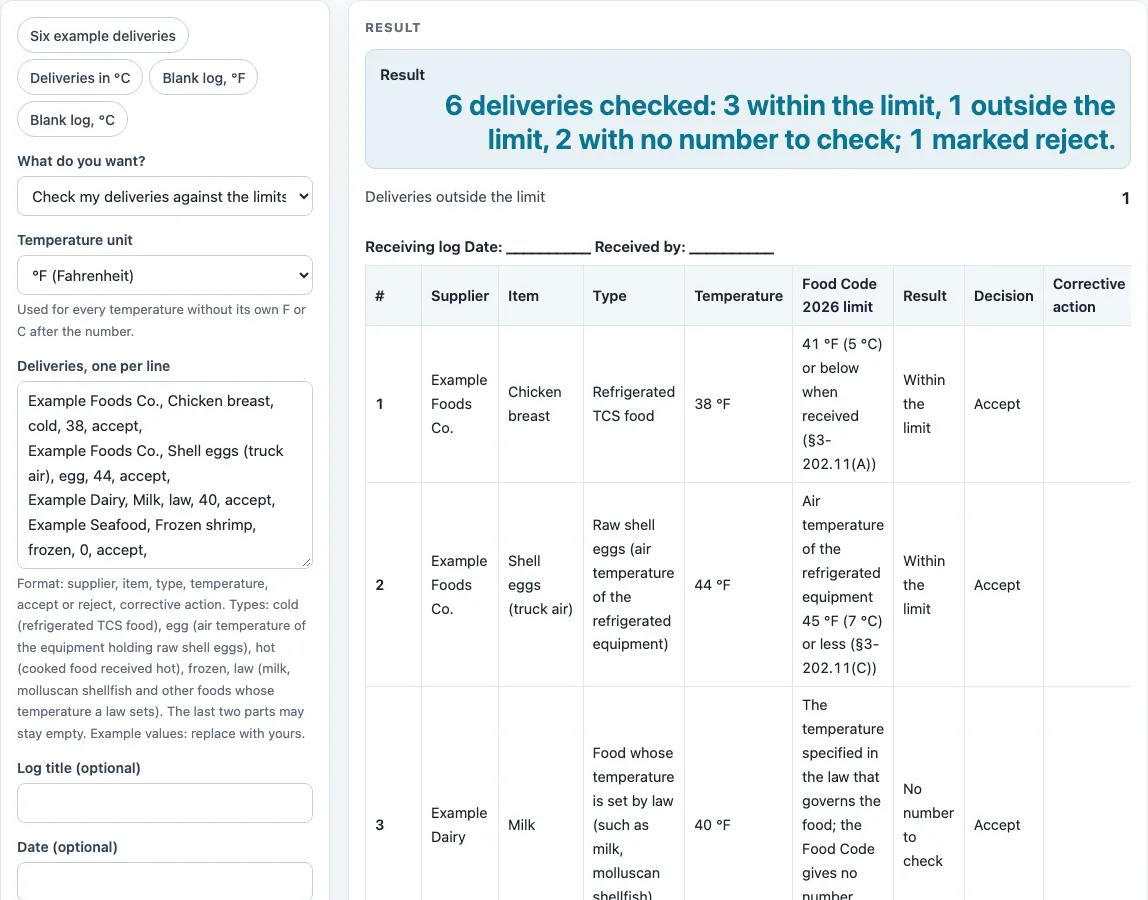
How to use the Receiving Log
- Choose “Check my deliveries” to compare temperatures, or “Print a blank receiving log” for an empty sheet.
- In check mode, type one delivery per line. Each line has six parts: supplier, item, type, temperature, accept or reject, and corrective action.
- Separate the parts with commas. You can use a “|” or a tab instead. The last two parts may stay empty, and the corrective action may contain commas.
- Pick the type: cold, egg, hot, frozen, or law. Use law for foods whose temperature a law sets, such as milk and molluscan shellfish. The words milk and shellfish also work.
- Type the temperature. Add F or C after the number if it differs from the unit chosen on the page, for example 41 F or 5 C.
- Mark each line accept or reject based on your own decision. The page warns you if a delivery is marked accept while outside the limit, marked reject while within it, has no temperature, or has a temperature far from any food temperature.
- Read the result table. It lists #, supplier, item, type, temperature, the limit with its section number, the result, your decision, and your corrective action. The reference table of receiving limits follows it.
- For a blank sheet, choose between 1 and 60 rows (the default is 15). The columns are date and time, supplier, item, type, temperature, accept or reject, corrective action, and optional initials. Click “Print” to print it, or the CSV button to download it.
What temperature limits does a receiving log check?
A receiving log compares each delivery temperature with a limit stated by the FDA Food Code 2026 under section 3-202.11. Refrigerated TCS food must be 41 °F (5 °C) or below when received. Cooked TCS food received hot must be 135 °F (57 °C) or above. Raw eggs must be received in refrigerated equipment with an ambient air temperature of 45 °F (7 °C) or less. The page shows each limit with its section number so you can check the source.
Why does a reading exactly on the limit count as within it?
A boundary reading is within the limit. For refrigerated food, 41 °F and 5 °C are within. For hot food, 135 °F and 57 °C are within. A reading typed in Celsius is compared with the Code’s own Celsius figures (5, 7, and 57), not with a converted number. This means 4 °C is within the 5 °C limit and 7 °C is outside it for cold food.
Why does a milk or frozen delivery show “No number to check”?
The Food Code does not give a number for every food. Food labeled and shipped frozen must be received frozen under §3-202.11(E). Food whose temperature a law sets, such as milk and molluscan shellfish, may be received at that temperature under §3-202.11(B). Because the Code gives no figure for these, the page shows “No number to check” and does not invent one. The governing law and your local health department set the rule for these foods.
Why is there a line about evidence of temperature abuse?
Section 3-202.11(F) says TCS food must be free of evidence of previous temperature abuse when received. A thermometer reading alone does not show this, so the page prints it as a line under the log. Look at the condition of the food and its packaging at the door, and record your decision and any corrective action on the line for that delivery.
Who decides whether a delivery is accepted?
You do. The accept or reject decision belongs to the person receiving the delivery. The page only compares the numbers you type with the stated limits. The adopted edition of the Food Code and your local health department govern your operation, and they may be stricter than the limits shown here.
Sources (checked 15 October 2026): fda.gov · fda.gov
Worked examples
| Input | Result |
|---|---|
| 6 deliveries | 3 within, 1 outside, 2 without a number |
| 3 deliveries | 2 within, 1 outside, 0 without a number |
| 2 deliveries | 2 within, 0 outside, 0 without a number |
| blank log, 15 rows | 8 columns |
| blank log, 10 rows | 7 columns |
Calculated by the tool above; open it with the same values to see each step.
Frequently asked questions
What is a receiving log?
It is a record of each delivery’s supplier, item, temperature, and your accept or reject decision. Keeping it at the point of receiving gives you a clear history of what came in and what you did about it.
What temperature should refrigerated food be when received?
Under the FDA Food Code 2026, section 3-202.11(A), refrigerated TCS food must be 41 °F (5 °C) or below. Your local health department may adopt a different edition and may be stricter.
What is the limit for raw shell eggs?
For the egg type, the check uses the air temperature of the refrigerated equipment holding the eggs. The Food Code limit is 45 °F (7 °C) or less, under section 3-202.11(C).
Why does milk or frozen shrimp show “No number to check”?
The Food Code gives no number for foods whose temperature a law sets, or for food labeled and shipped frozen. The page does not invent one. Use the law or rule that governs that food.
Can I type temperatures in Celsius?
Yes. Add C after the number, such as 4 C, or let the unit chosen on the page apply. Celsius readings are compared with the Code’s Celsius figures of 5, 7, and 57.
Does the tool decide whether to accept a delivery?
No. The tool compares the numbers you type with the stated limits. The accept or reject decision is yours, and the page only reports whether a reading is within the stated limit.
Can I print a blank log?
Yes. Choose “Print a blank receiving log”, pick between 1 and 60 rows, then click “Print” or the CSV button to download it.
Related tools
Corrective Action Form: use it to record the steps you took when a delivery was outside the limit.
Food Safety Checklist: use it to review other daily food safety tasks alongside your deliveries.
Food Waste Log: use it to track food you had to throw away, including rejected deliveries.
Restaurant Inventory Template: use it to count stock that arrives and is on hand.
Cleaning and Sanitizing Log: use it to record cleaning and sanitizing tasks for equipment that holds deliveries.
Restaurant Opening Checklist: use it to check equipment and receiving steps before service starts.
Restaurant Cleaning Checklist: use it to plan cleaning routines for the receiving area and storage.
Kitchen Checklists and Logs: see all the checklists and logs on this site in one place.