Restaurant Inventory Template
Print the count sheet, or type your items with par, on hand and case size to see the value on hand and what to order.
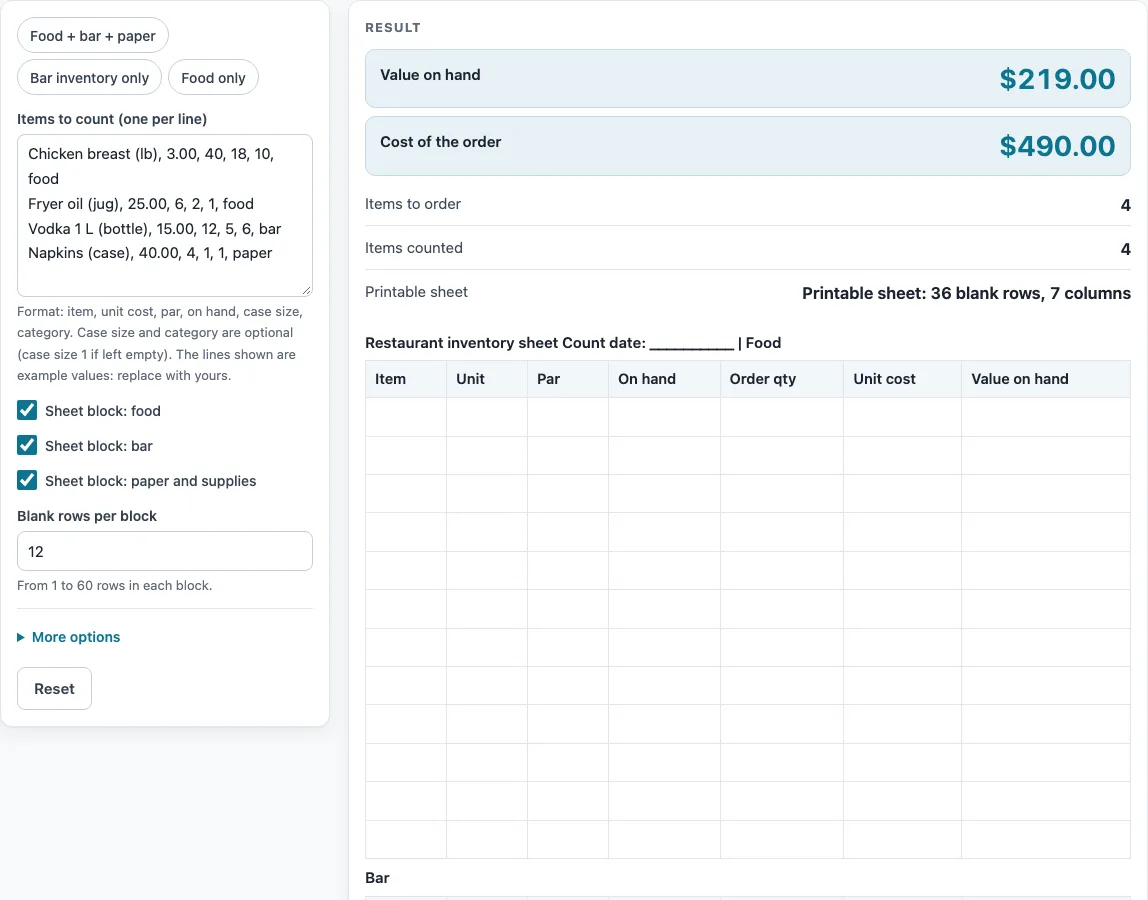
How to use the restaurant inventory template
- Tick the blocks you need: food, bar, and paper and supplies. Each block switches on or off, and at least one must be ticked.
- Set the rows per block. The default is 12, and you can enter from 1 to 60. A larger number is capped with a warning, and 0 gives an error.
- For a blank count sheet, click “Print” and count by hand. The columns are Item, Unit, Par, On hand, Order qty and, optionally, Unit cost and Value on hand.
- To calculate, type your items above the sheet, one per line, in this order: item, unit cost, par, on hand, case size, category. Case size and category are optional. An empty case size counts as 1.
- Check each line for the four placeholder values, then replace them with your own items. For example, a line for limes could be: limes, your unit cost, 200, 340.
- Read the four outputs: value on hand, cost of the order, number of items counted and number of items to order.
- If you typed categories, check the totals-by-category table. It shows the item count, value on hand and order cost for each category.
- Click “CSV” to download all the tables, or “Print” to print them.
How do you work out what to order for a restaurant inventory?
The page compares what you have with what you want to keep on hand. The par is your target stock, and the on hand figure is what you counted. Order quantity equals par minus on hand, rounded up to whole cases.
What does the order quantity formula mean?
The formula is ceil((par − on hand) ÷ case size) × case size. It takes the shortfall, divides it by the case size, rounds that up to a whole number of cases, then multiplies back to units. When on hand is at or above par, the order quantity is 0.
Why does the order round up to whole cases?
You can only buy whole cases. Chicken needs 22 lb to reach par, and the case size is 10, so the order is 3 cases, or 30 lb. Vodka needs 7 bottles with a case size of 6, so the order is 2 cases, or 12 bottles. The rounding is always up, so the order never falls short of par.
How is value on hand calculated?
Value on hand equals on hand multiplied by unit cost. Order cost equals order quantity multiplied by unit cost. The page adds money in whole cents, so the totals do not drift from rounding.
What do the numbers in the example mean?
With the default placeholder lines, the value on hand is $219.00: chicken $54, oil $50, vodka $75 and napkins $40. The order is 30 lb of chicken, 4 jugs of oil, 12 bottles of vodka and 3 cases of napkins, costing $90 + $100 + $180 + $120 = $490.00. A line with no shortfall needs no order: limes with 340 on hand against a par of 200 give an order quantity of 0.
How do the categories and the printed sheet work?
If you type a category as the sixth part of a line, the page adds a totals-by-category table with the item count, value on hand and order cost for each category. The printed count sheet is separate. It has the columns Item, Unit, Par, On hand and Order qty, plus Unit cost and Value on hand if you leave the cost columns on, and you can print it blank to count by hand. All costs come from your own unit costs.
What happens when a line is wrong?
Case size must be above zero, and unit cost, par and on hand must be zero or more. A bad line stops the calculation and shows an error naming its line number, so you can fix that line and run it again.
Sources: none needed; this page only does arithmetic on the numbers you type.
Worked examples
| Input | Result |
|---|---|
| 36 blank rows plus typed items | Value on hand $219.00, order $490.00 |
| 24 blank rows plus typed items | Value on hand $97.00, order $24.00 |
| 40 blank rows plus typed items | Blank sheet with 40 rows |
| 36 blank rows plus typed items | Value on hand $21.00, order $45.00 |
Calculated by the tool above; open it with the same values to see each step.
Frequently asked questions
Is this restaurant inventory template free to use?
Yes. The page is free, and everything runs in your browser. You do not need an account to print the blank sheet or run the calculation.
Does the page upload my stock numbers?
No. Nothing is uploaded, because the calculations run in the browser on your device. You can download your tables as a CSV file with the “CSV” button if you want a copy.
Can I use this as a bar inventory template?
Yes. Tick the bar block alongside the food block or on its own. Type your bar items in the same line format, with the case size and category if you want them.
Can I use it as a restaurant inventory sheet for paper and supplies?
Yes. Tick the paper and supplies block and enter napkins, cups or other supplies the same way. The order and value outputs cover that block too.
Why does an item show 0 to order?
The on hand figure is at or above par, so the order quantity is 0. Check that the par and on hand numbers are the ones you meant.
Do the costs use real prices?
No. The page uses no published prices. Costs come only from the unit costs you type, and the four placeholder lines are labelled ’example values: replace with yours'.
Related tools
Receiving Log: use it to record deliveries as they arrive, so you can check them against what you ordered.
Food Waste Log: use it to track food thrown out, which helps explain differences between your counts.
Food Safety Checklist: use it to review food handling tasks alongside your stock work.
Cleaning and Sanitizing Log: use it to record cleaning and sanitizing tasks for each shift.
Restaurant Cleaning Checklist: use it to plan the cleaning jobs for a restaurant space.
Restaurant Opening Checklist: use it to confirm the stock and setup tasks before service starts.
Corrective Action Form: use it to write down a problem found during a check and what was done about it.
Kitchen Checklists and Logs: see all the checklists and logs on this site in one place.
Restaurant Costs: see the cost calculators for a restaurant.