Restaurant Opening Checklist
Switch between opening and closing, tick the sections you use, add blank lines for your own tasks and print the sheet.
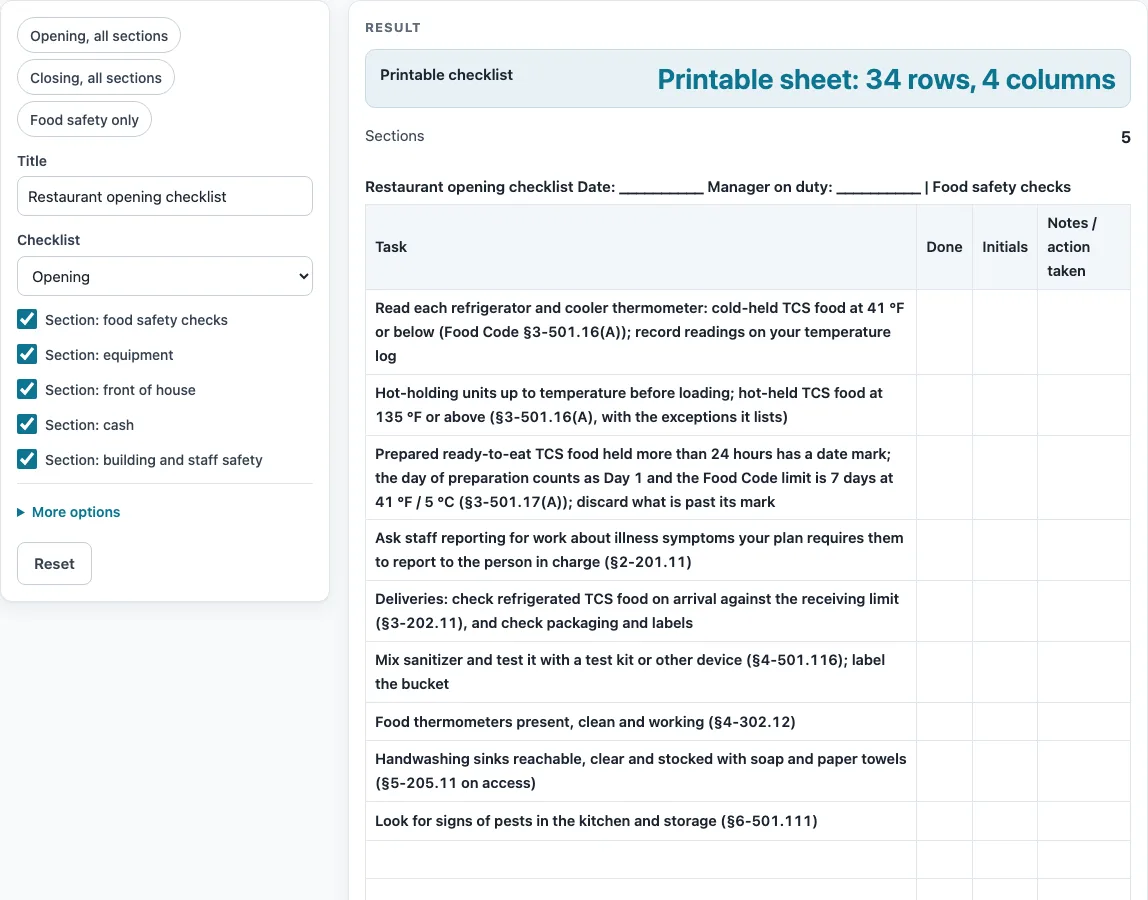
How to use the Restaurant Opening Checklist
- Set the Checklist switch to Opening or Closing. The sections that belong to the other mode are hidden.
- Type a name for the list in the Title field. It accepts any free text.
- Tick the sections you need and untick the ones you do not. At least one section must stay ticked, or the page shows the error “Tick at least one section.”
- Choose the temperature unit, °F or °C. It changes the temperatures in the food-safety task text.
- Set “Blank lines added to each section”. It adds 0 to 10 empty rows to every shown section, and the default is 2. Anything above 10 is capped, and a warning appears.
- Keep or switch off the Notes column. The heading line prints blank fields for the date and the manager on duty.
- To load a set quickly, use a preset chip: “Opening, all sections”, “Closing, all sections” or “Food safety only”.
- For each task on the printed sheet, mark the Done column, write your initials in the Initials column, and record anything unusual or any action taken in the Notes / action taken column.
- Click the CSV button to download the sections as one file, or print the sheet.
Because nothing is stored, download the CSV or print the sheet before you close the tab if you want to keep the list.
What is a restaurant opening checklist?
A restaurant opening checklist is a list of tasks to finish before service starts, grouped into sections so each person knows what to check. This tool’s opening list has five sections: food safety checks (9 tasks), equipment (5), front of house (4), cash and register (3), and building and staff safety (3), for 24 tasks in total. Each task has a Done column, an Initials column, and a Notes / action taken column, so a manager can see who checked what and what was done about a problem.
What does a restaurant closing checklist cover?
A restaurant closing checklist covers the end of service: food safety, cleaning, equipment, cash, and locking up. This tool’s closing list has food safety checks (6 tasks), cleaning (4), equipment (3), cash and register (3), and locking up (3), for 19 tasks in total. The mode switch hides the sections that belong to the other mode, so the closing list only shows closing work.
How do the Food Code temperature limits work?
The food-safety tasks use the limits stated by the FDA Food Code. Cold-held TCS food should be at 41 °F / 5 °C or below. Hot-held TCS food should be at 135 °F / 57 °C or above. The temperatures switch between °F and °C with the unit field, and the Celsius values are the Food Code’s printed pairs.
Date marking follows section 3-501.17(A). The day of preparation is Day 1, and the Food Code limit is up to 7 days at 41 °F for prepared ready-to-eat TCS food held more than 24 hours. The cooling task only tells you to follow your written cooling procedure. This page states no cooling times, so use the times in your own procedure.
Why are some tasks tied to Food Code sections?
Most food-safety tasks name the FDA Food Code 2022 section they come from, so you can look up the wording yourself. The sections used are 3-501.16(A), 3-501.17(A), 3-202.11, 2-201.11, 4-501.116, 4-302.12, 5-205.11, 3-304.14, 3-302.11, 4-602.11, 6-501.12, and 6-501.111.
Your local health department adopts its own code edition and may set stricter rules, so check that edition before relying on any task. The FDA’s Food Code page lists a 2026 edition as current. The full text we could read was the 2022 edition, and we did not compare the figures against the 2026 text.
Which tasks can I change?
Cash, equipment, front-of-house, and security tasks have no Food Code basis. They come from our own list, so you can edit, delete, or add to them to fit your restaurant. Use the extra lines number to leave blank rows in each section for tasks that are not on the list.
Sources (checked 15 October 2026): fda.gov · fda.gov
Worked examples
| Input | Result |
|---|---|
| 5 sections | 34 rows, 4 columns |
| 5 sections | 29 rows, 4 columns |
| 3 sections | 18 rows, 4 columns |
| 3 sections | 27 rows, 3 columns |
Calculated by the tool above; open it with the same values to see each step.
Frequently asked questions
Does the checklist follow my local code?
The page makes no claim about your local rules. Check the code edition your local health department has adopted, because it may be stricter than the FDA Food Code 2022 sections cited here.
Can I use the same tool for a restaurant closing checklist?
Yes. Set the mode switch to closing, or use the “closing” preset chip. The closing list has 19 tasks in five sections.
How many rows will I get with the default settings?
With defaults, the opening list has 34 rows in 4 columns: 24 tasks plus 10 blank lines. The closing list has 29 rows: 19 tasks plus 10 blank lines. The 10 blank lines come from the default of 2 extra lines in each of the five sections, so the count depends on the setting you choose.
What does the “extra lines” number do?
It adds 0 to 10 blank rows to every shown section. The default is 2. If you enter more than 10, the tool caps it at 10 and shows a warning.
Is my checklist saved anywhere?
No. Everything runs in your browser, nothing is uploaded, and nothing is stored. Download the CSV if you want to keep a copy.
Do I need to create an account?
No. There is no sign-up, and the tool is free to use.
Where do the cooling times come from?
This page states no cooling times. The cooling task says to follow your written cooling procedure.
Related tools
Cleaning and Sanitizing Log: Use it to record cleaning and sanitizing tasks as they are done.
Corrective Action Form: Use it to write down a problem and the action taken to fix it.
Food Safety Checklist: Use it for a standalone list of food-safety checks outside an opening or closing shift.
Food Waste Log: Use it to track food thrown away and why.
Receiving Log: Use it to record deliveries and check them as they arrive.
Restaurant Cleaning Checklist: Use it when you need a cleaning-only list for your shift.
Restaurant Inventory Template: Use it to count stock on hand alongside your opening or closing routine.
Kitchen Checklists and Logs: see all the checklists and logs on this site in one place.