Restaurant Tip Calculator
Enter the bill, the tax and the tip percentage, then how many people share it; you get the tip, the total and what each person pays, plus a table of common percentages.
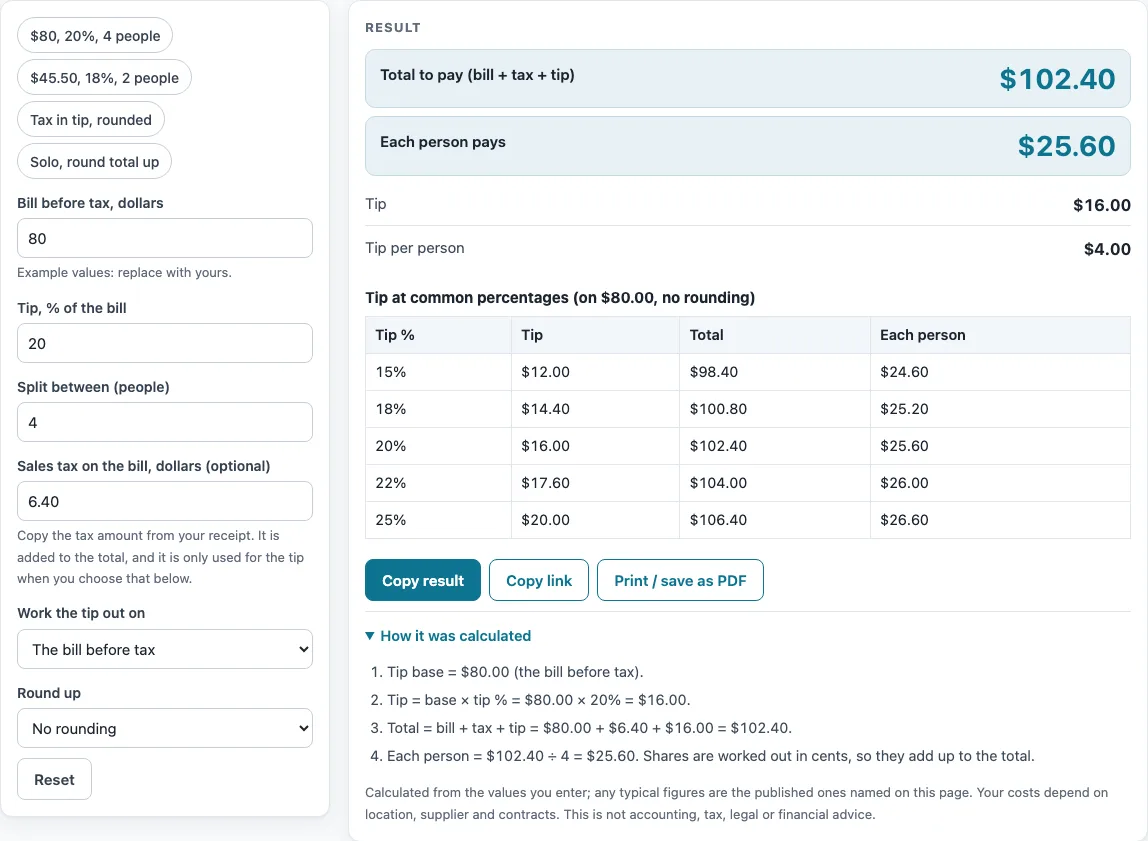
How to use the Restaurant Tip Calculator
- Type the bill before tax in dollars. The amount must be above zero, or the page shows an error message.
- Type the sales tax in dollars. This field is optional, so you can leave it out if there is no tax to add.
- Type the tip percentage. Any value from 0 to 200 is accepted. A warning appears when the percentage is above 50%.
- Choose what to work the tip out on: “bill before tax” or “bill with tax”. The default is the bill before tax.
- Enter the number of people as a whole number from 1 to 500. Decimals and non-numeric entries show an error message.
- Pick a round-up option: none, tip up to the next whole dollar, total up to the next whole dollar, or each person’s share up to the next whole dollar. An amount that is already a whole dollar stays the same.
- Read the tip, the total and each person’s share. If the total does not divide evenly, the page shows the lower amount and says how many people pay one cent more.
Four presets are available: “$80, 20%, 4 people”, “$45.50, 18%, 2 people”, “Tax in tip, rounded” and “Solo, round total up”. Each one loads a set of example settings, so you can see how the page responds before you enter your own numbers. A table also shows 15%, 18%, 20%, 22% and 25% on the same base, without rounding, so you can compare percentages side by side.
How is the tip calculated?
The tip equals the tip base multiplied by the tip percentage, rounded to the nearest cent. The total equals the bill plus the tax plus the tip. For example, an $80.00 bill with $6.40 tax and a 20% tip on the pre-tax bill gives a tip of $16.00 ($80.00 × 0.20) and a total of $102.40 ($80.00 + $6.40 + $16.00).
What is the tip base?
The tip base is the amount the percentage is applied to. By default it is the bill before tax, so tax does not increase the tip. If you choose “bill with tax”, the page applies the percentage to the bill plus the tax instead. For example, a 22% tip on a $132.75 bill with $10.62 tax, worked out on the bill with tax, is $31.54 ($143.37 × 0.22). Changing the base changes the tip only when tax is entered, so check which option you have selected before you compare results.
How does rounding change the tip and total?
Rounding moves the tip, the total or each share up to the next whole dollar, depending on the option you choose. When the tip is rounded, the extra amount is added to the tip, so the total rises by the same amount. Using that bill with tax, three people and each share rounded up, the unrounded total is $174.91. Rounding gives a tip of $33.63, a total of $177.00 and $59.00 for each person. When a rounding option is used, the page also shows the tip after rounding as a percent of the bill. For example, an $80 bill with the tip rounded up from 18% to $15.00 gives 18.8%, because $15.00 divided by $80 is 18.75%, which is shown as 18.8%.
How is the total split between people?
Each person pays the total divided by the number of people, worked in cents. When the total does not divide evenly, the page shows the lower amount and states how many people pay one cent more, so the shares add up to the exact total. For example, $57.33 split between 2 people is $28.665 each, so the page shows $28.66 per person, with 1 person paying $28.67. The tip per person is found the same way, dividing the tip by the number of people.
What does the percentage table show?
The table shows the tip, total and each person’s share for 15%, 18%, 20%, 22% and 25%, all calculated on the same tip base. It does not apply any rounding option. Use it to compare how much a higher or lower percentage adds to the bill for the same amounts.
The page does not recommend a tip percentage: you type it yourself.
Sources: none. This page is arithmetic only.
Worked examples
| Input | Result |
|---|---|
| $80.00 bill, 20% tip, 4 people | Tip $16.00, total $102.40 |
| $45.50 bill, 18% tip, 2 people | Tip $8.19, total $57.33 |
| $132.75 bill, 22% tip, 3 people | Tip $33.63, total $177.00 |
| $62.00 bill, 15% tip, 1 people | Tip $10.00, total $72.00 |
Calculated by the tool above; open it with the same values to see each step.
Frequently asked questions
Frequently asked questions
Is this restaurant tip calculator free to use?
Yes. It is free, runs in your browser and needs no sign-up. Nothing you type is uploaded.
Does the tip include sales tax?
By default, no. The tip is based on the bill before tax. Choose “bill with tax” under what to work the tip out on if you want the percentage applied to the bill plus tax.
What happens if I enter a tip above 50%?
A warning appears when the tip percentage is above 50%. The page does not decide for you whether the percentage is right.
Why does one person pay a cent more than the others?
When the total cannot be divided exactly by the number of people, the page shows the lower amount for each person. It then states how many people pay one cent more, so the shares add up to the total.
What does the percentage after rounding mean?
It shows the rounded tip as a percent of the bill. It appears only when a rounding option is used, and it helps you see how far rounding moved the tip from the percentage you typed.
Why does the calculator show an error message?
An error appears if the bill is zero or negative, if the number of people is not a whole number, or if an entry is not a number. Correct the entry and the results will update.
Can I use this to split tips among staff?
This page calculates the tip and each person’s share of the total bill. For dividing tips among staff members, see the Tip Pool Calculator listed under related tools.
Related tools
- Catering Calculator: Use it to work out costs when you are pricing a catering order.
- How Much Does a Food Truck Cost? Startup Cost Worksheet: Use it to list your own startup costs for a food truck.
- Pour Cost Calculator: Use it to work out the cost of a drink from your own numbers.
- Restaurant Budget Template: Use it to plan monthly restaurant spending with your own figures.
- Restaurant Labor Cost Calculator: Use it to estimate what your staffing costs with your own inputs.
- How Much Does It Cost to Open a Restaurant? Cost Worksheet: Use it to organize the costs of opening a restaurant.
- Tip Pool Calculator: Use it when you need to divide tips among a group of staff.
- Restaurant Costs: the hub page for all the cost worksheets and calculators on this site.