Tip Pool Calculator
Enter the tips collected and each person's hours or points; you get each share to the cent, with the leftover cents handed out by a stated rule so the shares add up exactly.
The tip pool calculator splits a set amount of tips among the people who worked a shift. Each person’s share depends on their hours worked, their points, or their hours x points, depending on the split method you choose. It runs in your browser, is free, and needs no sign-up.
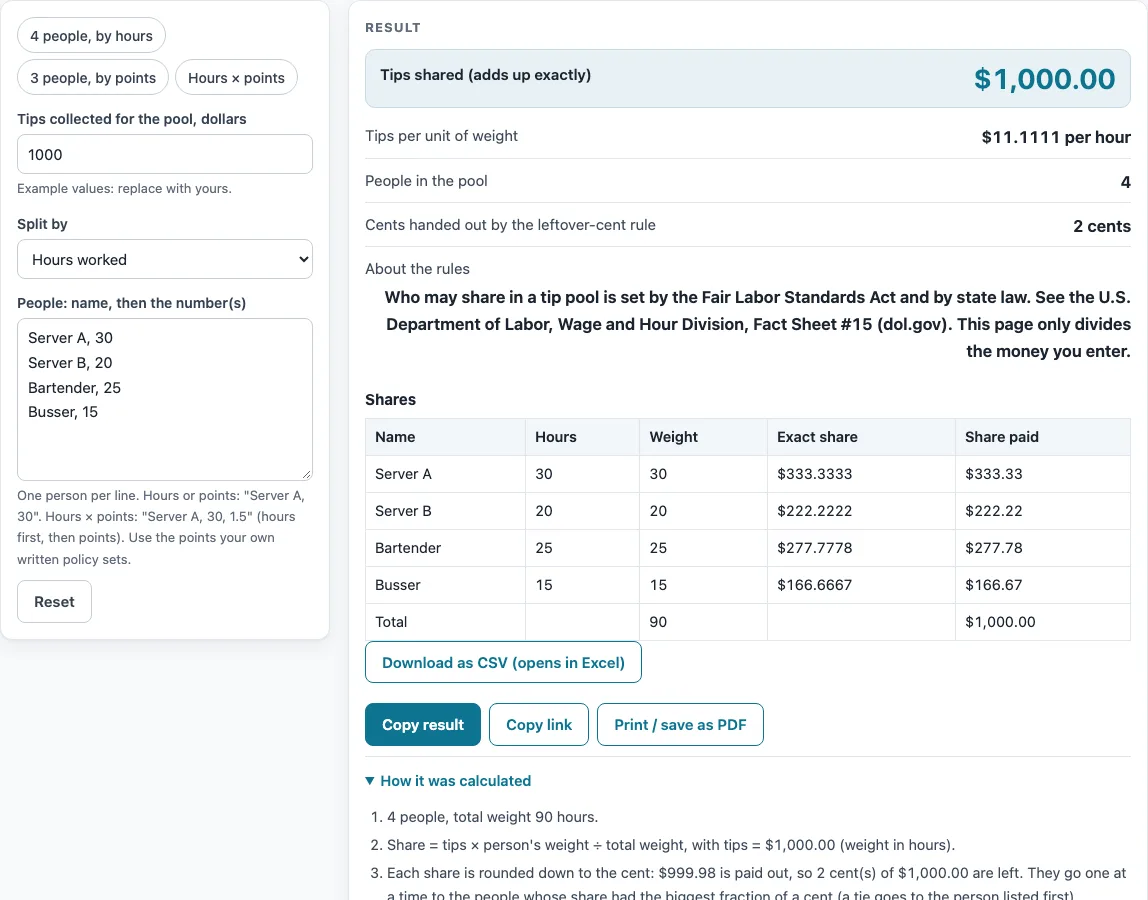
Enter the tips collected in dollars, pick a split method, and list each person on their own line. The page shows each person’s share in a table with the exact amount, the amount paid, and a total row. Nothing you type is stored or uploaded, so names stay in your browser. Use it for one shift or one pay period, and compare the results with your own records before paying anyone.
How to use the Tip Pool Calculator
- Type the tips collected in dollars into the tips field. The amount must be above zero.
- Choose a split method: hours worked, points, or hours x points.
- Enter the people in the people box, one per line. Use the format “name, number” for hours worked or points. For hours x points, use “name, hours, points”.
- If you want a starting point, click one of the presets: 4 people by hours, 3 people by points, or Hours x points. Then replace the sample names and numbers with your own; the sample names and hours are placeholders, not data.
- Check the lines before you calculate. You can separate values with commas, semicolons, or tabs. Up to 60 people fit in the list.
- Read the result. If a line is wrong, the page shows an error that names that line. If a person has zero hours or points, that person receives $0.00 and a warning appears.
- Review the table. It lists each person’s numbers, weight, exact share, and share paid, with a total row at the bottom.
- Click the CSV button to download the table as a file.
If an error says the total weight is zero, every person has zero hours or points. Fix the numbers, and the result will appear again.
How is each person’s tip pool share calculated?
Each person’s share is the tips multiplied by that person’s weight, divided by the total weight of everyone in the pool. The weight is the person’s hours, their points, or their hours x points, depending on the split method. This is the formula: share = tips x weight / total weight. Someone with twice the weight of another person receives twice the share.
Why are shares rounded down, and what happens to the leftover cents?
Each share is rounded down to the cent, so no one receives a fraction of a cent. Rounding down usually leaves a few cents unassigned. The page works out those leftover cents as the tips minus the sum of the rounded-down shares.
The leftover cents go out one at a time. Each goes to the person whose unrounded share had the largest fraction of a cent. If two people have the same fraction, the cent goes to the person listed first.
Here is an example. With tips of $1,000.00 and Server A at 30 hours, Server B at 20 hours, Bartender at 25 hours, and Busser at 15 hours, the exact shares are $333.3333, $222.2222, $277.7778, and $166.6667. The paid shares are $333.33, $222.22, $277.78, and $166.67. The rule handed out 2 cents, and the page reports that number.
Why does the paid total always equal the tips exactly?
The leftover-cent rule is designed to close the gap created by rounding. After it runs, the shares add up to the tips exactly, with no cent missing and no cent extra. The page shows how many cents were handed out this way, so you can see how much the rounding changed the result.
How does the split work when I use hours x points?
With hours x points, each person’s weight is their hours multiplied by their points. Each line needs three values: name, hours, and points.
Take $845.50 split by hours x points, with weights of 6 x 1, 4 x 1.5, and 5 x 1. The shares come out to $298.41, $298.41, and $248.68. The first two people have the same weight, 6 and 6, so they receive the same share.
Who is allowed to share in a tip pool?
The page does not decide who may share in a tip pool. That is set by the Fair Labor Standards Act and state law. For the federal rules, read the U.S. Department of Labor Fact Sheet #15. The calculator only does the arithmetic, so the names you enter are your decision to make under those rules.
Sources (checked 15 October 2026): dol.gov
Worked examples
| Input | Result |
|---|---|
| $1,000.00 among 4 people by hours | Shares $333.33, $222.22, $277.78, $166.67 |
| $300.00 among 3 people by points | Shares $128.57, $85.72, $85.71 |
| $845.50 among 3 people by hour-points | Shares $298.41, $298.41, $248.68 |
| $100.00 among 3 people by hours | Shares $33.34, $33.33, $33.33 |
Calculated by the tool above; open it with the same values to see each step.
Frequently asked questions
Does the tip pool calculator upload or save my data?
No. Nothing is stored or uploaded, and the names stay in your browser.
Why does someone show $0.00?
That person has zero hours or points on their line. A warning appears on the page so you can check the number. If the person should receive a share, correct the hours or points and calculate again.
Can I combine hours and points in one split?
Yes. Choose hours x points as the split method, then enter each person as “name, hours, points”. Each person’s weight is their hours times their points.
Why might one person’s cents differ from a simple division?
Each share is rounded down to the cent first. The leftover cents then go one at a time to the people with the largest fractions of a cent. The table shows the exact share next to the share paid, so you can see where each cent went.
Who is eligible to share in a tip pool?
The Fair Labor Standards Act and state law set that rule, and the page gives no conclusion about it. Read the U.S. Department of Labor Fact Sheet #15 and your state’s rules before you decide who is included.
Is the tip pool calculator free to use?
Yes. It is free, runs in your browser, and needs no sign-up.
Related tools
- Restaurant Tip Calculator: Use it to work out the tip amount on a bill before you add it to a pool.
- Restaurant Labor Cost Calculator: Use it to see how staff wages fit into your overall labor costs.
- Restaurant Budget Template: Use it to plan monthly income and expenses in a worksheet of your own numbers.
- Restaurant Costs: the hub page for all the cost worksheets and calculators on this site.
- Catering Calculator: Use it to work out costs for a catered event.
- Pour Cost Calculator: Use it to work out the cost per pour of a bottle.
- How Much Does It Cost to Open a Restaurant? Cost Worksheet: Use it to add up your own opening costs.
- How Much Does a Food Truck Cost? Startup Cost Worksheet: Use it to add up your own food truck costs.