Two-Stage Cooling Method Checker
Enter when cooling started, the starting temperature and your readings to see the clock-time deadlines and whether each target was reached in time, or print a blank cooling log.
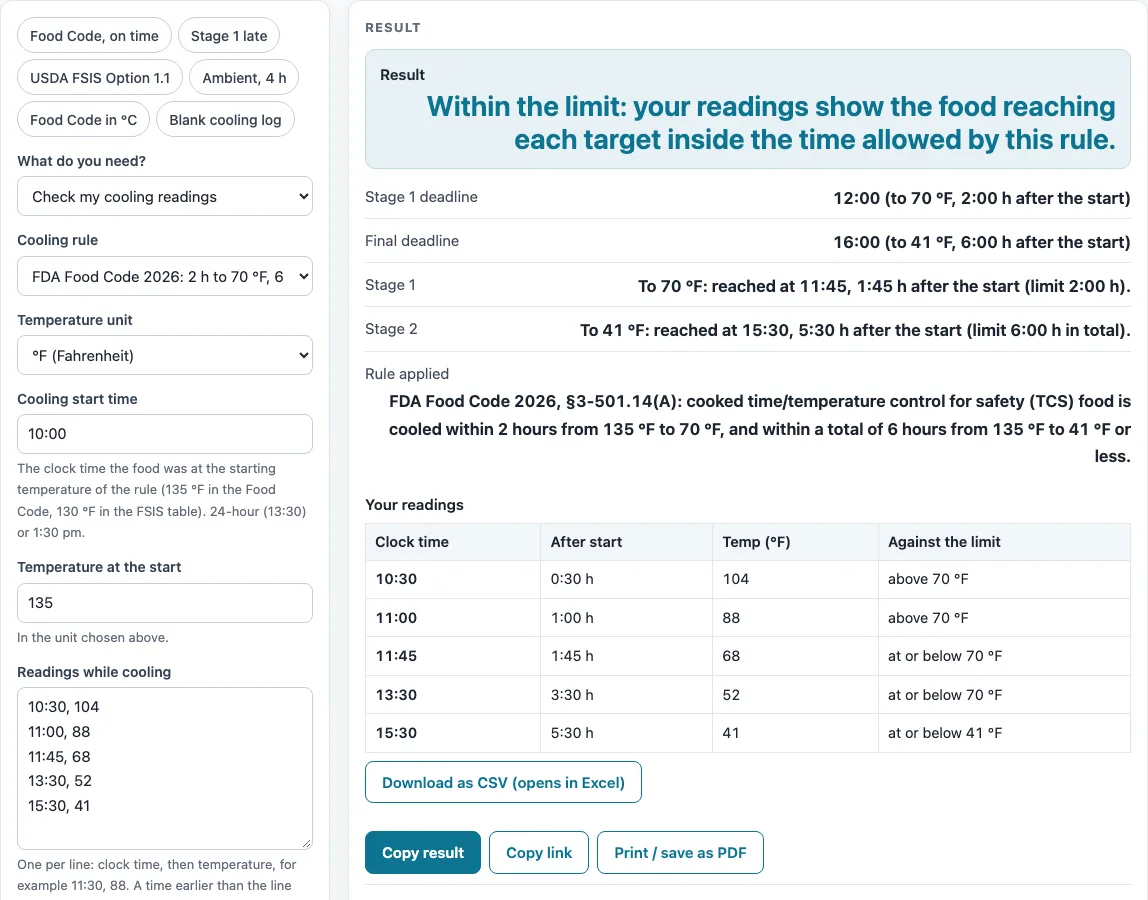
How to use the two-stage cooling method tool
- Select “Check my cooling readings” to check a cooling run. Select “Blank printable cooling log” if you only need a paper sheet.
- Choose a cooling rule: FDA Food Code 2026 §3-501.14(A), §3-501.14(B) for TCS food prepared from ambient-temperature ingredients, or USDA FSIS Revised Appendix B Option 1.1. The FSIS table is written for federally inspected meat and poultry establishments, so a restaurant should check its health department’s adopted Food Code.
- Enter the clock time when cooling started, in 24-hour or am/pm format.
- Enter the temperature at the start.
- Choose the unit, °F or °C.
- Enter each reading on its own line as “clock time, temperature”, for example “10:30, 104”. Readings can cover up to 24 hours after the start.
- Read any warnings. They appear if the start temperature is below the rule’s start (135 °F or 130 °F), if a reading is higher than the one before it, or if the food starts at or below the stage 1 target.
- Review the results: the stage 1 and final deadlines, whether each target was reached in time, the status, the table of readings with elapsed time, and the rule applied.
The “Blank printable cooling log” mode prints a log with the limits in its title. Each row has columns for date, food, start time and temperature, the time and temperature at each target, initials and corrective action. You can print 1 to 40 rows or download the log as a CSV file.
What is the two stage cooling method?
The two stage cooling method is a rule for cooling cooked food in two steps, each with its own time limit. Stage 1 must bring the food from the starting temperature down to the stage 1 target (70 °F in the FDA Food Code, 80 °F in the USDA FSIS guideline), and the final stage must bring it down to the final target (41 °F or 40 °F).
Why are there two deadlines in the two stage cooling method?
The first deadline is a checkpoint partway down, and the second is the final target. The FDA Food Code uses 2 hours from 135 °F to 70 °F, then 6 hours in total to 41 °F. The USDA FSIS guideline uses 1.5 hours from 130 °F to 80 °F, then 6.5 hours in total to 40 °F. The tool shows both deadlines as clock times, counted from the start.
How does the tool decide whether a target was reached?
The tool uses the first reading that is at or below a target. It does not estimate between two readings. A reading exactly on a limit, such as 2:00 hours or 70 °F, counts as within the limit.
For example, cooling starts at 10:00 at 135 °F under the Food Code, so the deadlines are 12:00 (70 °F) and 16:00 (41 °F). If the first reading at or below 70 °F is at 12:15, that is 2 hours 15 minutes after the start. The tool reports the food as outside the limit, even if 41 °F is reached later.
What happens when cooling runs past midnight?
A reading time that is earlier than the line above it is treated as the next day. This lets a long cooling run continue past midnight. Readings can cover up to 24 hours after the start.
Which cooling rule should I choose?
Choose the rule that your health department or your establishment follows. The FDA Food Code 2026 §3-501.14(A) applies to general cooling. The §3-501.14(B) rule applies to TCS food prepared from ambient-temperature ingredients and uses 4 hours to 41 °F. The FSIS table is for federally inspected meat and poultry establishments. Annex 3 of the Food Code calls its rule “similar, though not identical” to the FSIS guidelines, so the tool shows both and lets you choose.
What happens when a limit is missed?
The tool reports the food as outside the limit and quotes the source. The Food Code cooling section lists no corrective action. Its Annex 3 gives an example of cooling to 70 °F taking 3 hours. The FSIS guideline says the establishment determines the cause, supports its product decision (9 CFR 417.3), and is advised to model first.
Sources (checked 15 October 2026): fda.gov · fsistraining.fsis.usda.gov · fsis.usda.gov · fda.gov
Worked examples
| Input | Result |
|---|---|
| FDA Food Code 2026: 2 h to 70 °F, 6 h to 41 °F; start 10:00 at 135 °F; 5 readings | Within the limit: your readings show the food reaching each target inside the time allowed by this rule. |
| FDA Food Code 2026: 2 h to 70 °F, 6 h to 41 °F; start 10:00 at 135 °F; 5 readings | Outside the limit: your readings do not show the food reaching a target inside the time allowed by this rule. |
| USDA FSIS Option 1.1: 1.5 h to 80 °F, 6.5 h to 40 °F; start 08:00 at 130 °F; 4 readings | Within the limit: your readings show the food reaching each target inside the time allowed by this rule. |
| FDA Food Code 2026: ambient ingredients, 4 h to 41 °F; start 09:00 at 60 °F; 3 readings | Within the limit: your readings show the food reaching each target inside the time allowed by this rule. |
| FDA Food Code 2026: 2 h to 70 °F, 6 h to 41 °F; start 10:00 at 57 °C; 4 readings | Within the limit: your readings show the food reaching each target inside the time allowed by this rule. |
Calculated by the tool above; open it with the same values to see each step.
Frequently asked questions
What temperatures does the two stage cooling method use?
Under FDA Food Code 2026 §3-501.14(A), food must cool from 135 °F to 70 °F within 2 hours, then reach 41 °F within 6 hours in total. The FSIS guideline uses 130 °F to 80 °F within 1.5 hours, then 40 °F within 6.5 hours in total.
Does a reading exactly on the limit count?
Yes. A reading exactly on a limit, such as 2:00 hours or 70 °F, is counted as within the limit.
Can I enter temperatures in Celsius?
Yes. Select °C as the unit. In °C the Food Code values are used as printed: 57, 21 and 5 °C. The FSIS limits are converted exactly, so 80 °F is 26.67 °C and 40 °F is 4.44 °C.
Does a result from this tool rule on my food?
No. The result shows only whether your readings met the limits of the rule you selected. Your local health department adopts its own edition of the code and may be stricter.
What if my starting temperature is too low?
The tool shows a warning when the start temperature is below 135 °F for the Food Code or 130 °F for the FSIS guideline. Check the start reading, because the cooling rule starts at those temperatures.
Are my readings uploaded anywhere?
No. Nothing is uploaded. The calculation runs in your browser.
Related tools
Food Temperatures, Holding and Cooling: use it to see every food temperature page on this site in one place.
Food Danger Zone Time Calculator: use it to check how long food has spent between the warmer and cooler temperatures.
Food Temperature Log: use it to record food temperatures over a day or shift.
Hot Holding Temperature Checker: use it to check food that is kept hot after cooking.
How Long Can Food Sit Out?: use it to check how long food can stay at room temperature.
TCS Food List: use it to see which foods are time and temperature controlled for safety.
Walk-In Cooler and Freezer Temperature Log: use it to log storage temperatures for coolers and freezers.
Cold Chain Monitoring: Logger CSV to Printable Report: use it when you have logger data files and need a printable report.