VFC Temperature Log and Vaccine Storage Check
Type your minimum and maximum readings to see which checks fall outside the CDC range for a vaccine refrigerator or freezer, or print a blank daily log.
How to use the Vaccine Temperature Log
- Choose a mode: “Check my logged readings” or “Blank printable log”. Then choose the storage unit: refrigerator or freezer.
- Choose your thermometer type: minimum and maximum, or current temperature only.
- Choose °F or °C to match what your thermometer shows.
- Enter one check per line, with an optional label. For a minimum and maximum device, use
label, minimum, maximum, for exampleMon, 37.8, 41.5. For a current-only device, uselabel, temperature. - Enter up to 400 checks. If a line has a minimum higher than its maximum, the page rejects it and shows the line number, so correct that line.
- Read the result. It states how many checks are outside the range and whether each one is too cold, too warm, or both.
- For any check that is outside, follow the excursion steps the page lists.
- For the blank printable log, optionally enter a start date in YYYY-MM-DD format and choose how many days the log covers, from 1 to 31.
- Print the log or download it as a CSV file.
The printable log has columns for date, time, minimum and maximum (or two rows a day, start and end of day, with a current temperature column), initials, and action taken. The range appears in the title, so the sheet shows which limits you checked against.
What temperature range does a vaccine storage log check against?
The check uses two ranges from the CDC Vaccine Storage and Handling Toolkit (July 2026). A refrigerator reading is inside 36 to 46 °F (2 to 8 °C), and a freezer reading is inside -58 to +5 °F (-50 to -15 °C). The °F and °C pairs are shown as the toolkit prints them, so 8 °C and 46 °F are the same upper refrigerator limit.
Does a reading exactly on a limit count as in range?
Yes. The toolkit says “between” those values, so 36 or 46 °F, 2 or 8 °C, -58 or 5 °F, and -50 or -15 °C all count as inside. A reading that is even slightly past a limit counts as outside.
How does the check decide a reading is too cold or too warm?
A minimum and maximum check has two numbers. It is too cold when its minimum is below the range, and too warm when its maximum is above it. One check can be outside on both sides. A current-only reading is compared with both ends of the range, so that single number can be too cold or too warm.
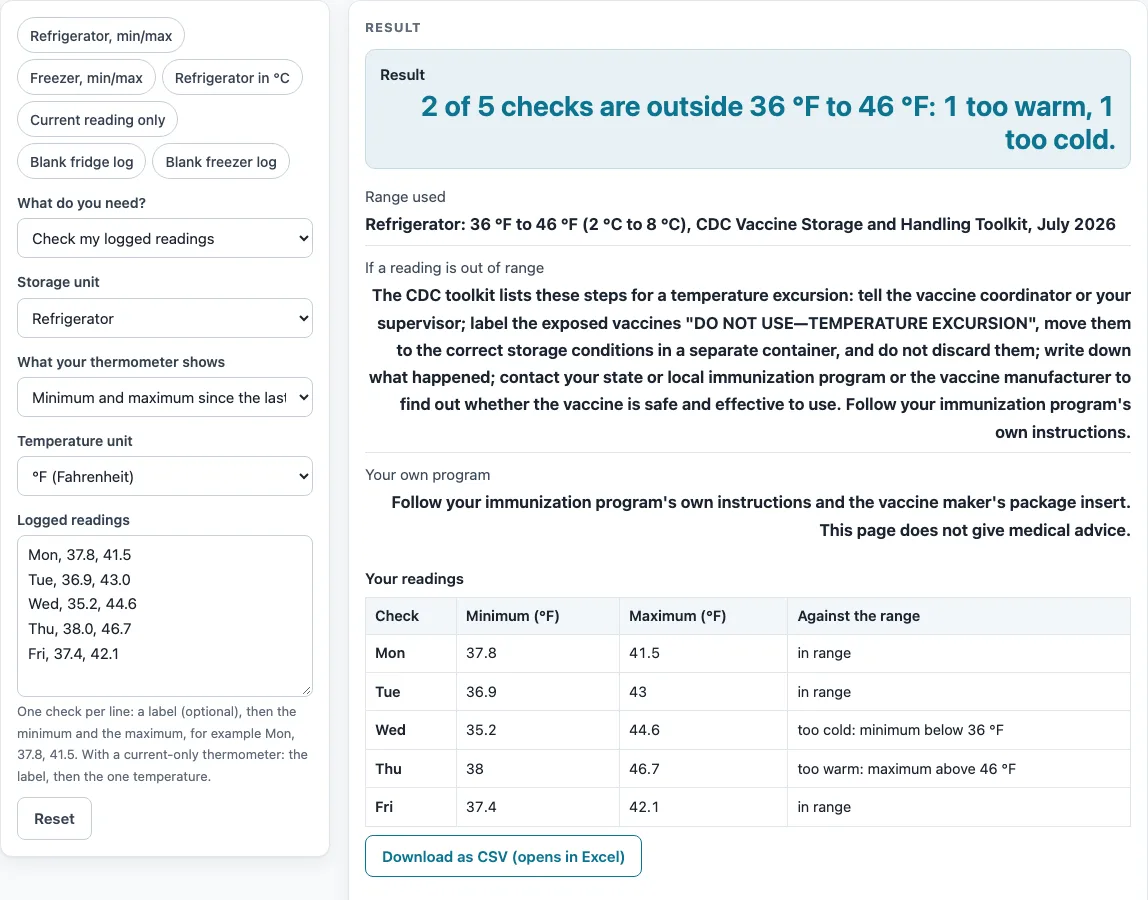
In the default refrigerator example, Wed 35.2 to 44.6 °F is too cold because 35.2 is below 36 °F. Thu 38.0 to 46.7 °F is too warm because 46.7 is above 46 °F. Mon, Tue, and Fri stay inside, so the result reads 2 of 5 checks outside.
How often should vaccine storage temperatures be recorded?
Follow the toolkit notes printed under the sheet. With a device that records a minimum and maximum, check and record both at the start of each workday. With a current-only thermometer, record at least twice a day, at the start and at the end of the workday.
What should you do when a vaccine check is outside the range?
When a check is outside, the page lists the toolkit’s steps for an excursion. Tell your vaccine coordinator or supervisor. Label exposed vaccines “DO NOT USE—TEMPERATURE EXCURSION” and move them to the correct storage in a separate container without discarding them. Document the event, then contact your state or local immunization program or the vaccine manufacturer.
How long should vaccine temperature logs be kept?
The notes under the sheet say to keep logs for 3 years. Programs that supply vaccine may have their own rules, so check with your program before you discard any records.
Sources (checked 15 October 2026): cdc.gov · cdc.gov
Worked examples
| Input | Result |
|---|---|
| 5 checks against Refrigerator: 36 °F to 46 °F (2 °C to 8 °C), CDC Vaccine Storage and Handling Toolkit, July 2026 | 2 of 5 checks are outside 36 °F to 46 °F: 1 too warm, 1 too cold. |
| 3 checks against Refrigerator: 36 °F to 46 °F (2 °C to 8 °C), CDC Vaccine Storage and Handling Toolkit, July 2026 | 1 of 3 checks are outside 2 °C to 8 °C: 0 too warm, 1 too cold. |
| 3 checks against Freezer: -58 °F to 5 °F (-50 °C to -15 °C), CDC Vaccine Storage and Handling Toolkit, July 2026 | 1 of 3 checks are outside -58 °F to 5 °F: 1 too warm, 0 too cold. |
| 3 checks against Refrigerator: 36 °F to 46 °F (2 °C to 8 °C), CDC Vaccine Storage and Handling Toolkit, July 2026 | 1 of 3 checks are outside 36 °F to 46 °F: 1 too warm, 0 too cold. |
Calculated by the tool above; open it with the same values to see each step.
Frequently asked questions
Is this vfc temperature log free and private?
Yes. It is free, it runs in your browser, nothing is uploaded, and no sign-up is needed.
Does the result mean my vaccines can be used?
No. The page compares your readings with the toolkit ranges and does not give medical advice. Follow your immunization program’s instructions and the vaccine package insert.
Does this page cover ultra-cold freezers?
No. The toolkit’s third category, ultra-cold freezers (-90 to -60 °C), is not built into this page. Use the refrigerator or freezer unit types for the units this page covers.
How many days and checks can I put on one log?
You can print from 1 to 31 days, and enter up to 400 checks.
What happens if a line has a minimum higher than its maximum?
The page rejects that line and shows its line number. Correct the numbers on that line, then the result updates.
Is this the same as a food temperature log?
No. This page checks vaccine storage against the CDC toolkit ranges. For food temperatures, use the Food Temperature Log page.
What ranges does the page use?
A refrigerator reading is checked against 36 to 46 °F (2 to 8 °C), and a freezer reading against -58 to +5 °F (-50 to -15 °C). Both come from the CDC Vaccine Storage and Handling Toolkit (July 2026).
Related tools
Food Temperatures, Holding and Cooling: Use this to see every food temperature page on this site in one place.
Cold Chain Monitoring: Logger CSV to Printable Report: Use this when your data comes from a logger and you want a printable report.
Food Danger Zone Time Calculator: Use this to check how long food has spent in the temperature danger zone.
Food Temperature Log: Use this to record food temperatures in a daily sheet.
Hot Holding Temperature Checker: Use this to check whether a hot food reading is within the limit you choose.
How Long Can Food Sit Out?: Use this to estimate how long food can stay out before it needs action.
TCS Food List: Use this to see which foods are time and temperature control for safety foods.
Two-Stage Cooling Method Checker: Use this to check cooling steps for cooked food.
Walk-In Cooler and Freezer Temperature Log: Use this to record temperatures for a walk-in cooler or freezer.