Walk-In Cooler and Freezer Temperature Log
Type your readings to see which are inside the limit you pick (Food Code, USDA or your own), look up storage temperatures with their sources, or print a daily log.
This walk in cooler temperature checker compares logged unit readings against a limit you choose, in °F or °C. It runs in your browser for free, with no sign-up, and nothing is uploaded. Use it to count how many readings fall within, above or below a limit, and to print a log for a walk-in cooler, refrigerator or walk-in freezer.
The page also has a reference chart of storage temperatures. It lists cold holding, refrigerated food when received, shell eggs, frozen food, where the unit thermometer sits and two USDA figures, each with its source. You can switch the chart off under More options.
You can check readings against the FDA Food Code 2026, against USDA FSIS appliance guidance, or against your own limits. Your local health department adopts its own code edition, which governs and may be stricter than either reference.
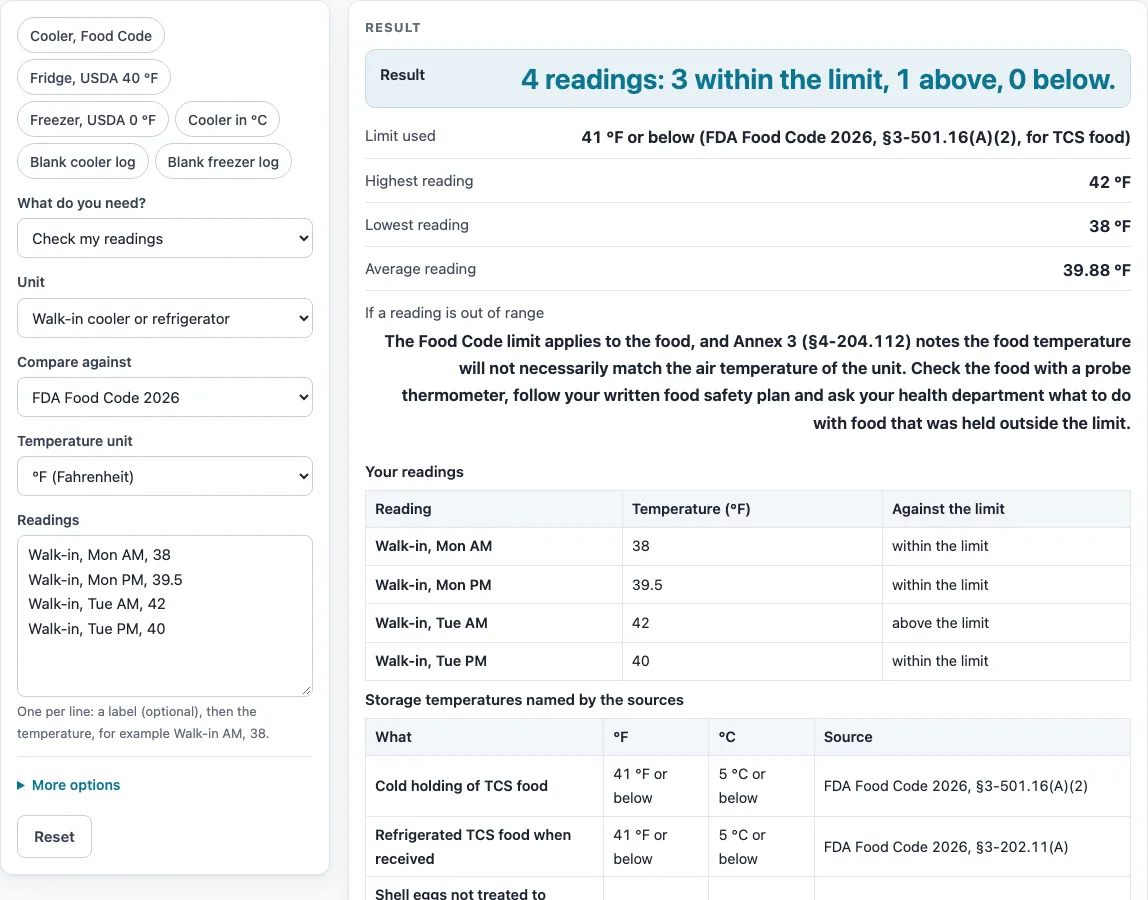
How to use the Walk-In Cooler Temperature Checker
- Choose the unit: “walk-in cooler or refrigerator” or “walk-in freezer”.
- Choose °F or °C.
- Choose what to compare against: FDA Food Code 2026, USDA FSIS appliance guidance, or “My own limits”.
- If you chose “My own limits”, enter an upper limit, a lower limit or both. At least one is required, and the lower limit cannot be above the upper limit.
- Type one reading per line. Each line can have an optional label before the temperature, for example: Walk-in, Mon AM, 38. Unlabeled lines are named Reading 1, Reading 2 and so on. You can enter up to 400 readings.
- Read the results: the count within, above and below the limit; the highest, lowest and average reading; the limit used; and, if anything is out of range, the action text.
- If you chose walk-in freezer with the FDA Food Code, the readings are not judged and a warning tells you why.
For a written record, use the printable log. It has columns for date, unit or location, AM and PM readings, initials and corrective action, for days 1 to 31. An optional YYYY-MM-DD start date fills the date column, the limit is printed in the title, and you can download the log as a CSV file. To hide the reference chart, open More options.
What is the walk in cooler temperature limit in the FDA Food Code?
The FDA Food Code 2026 sets the cooler limit for TCS food at 41 °F (5 °C) or below, cited as §3-501.16(A)(2). A reading exactly on 41 °F counts as within the limit, and this tool applies that figure when you choose the Food Code.
The limit applies to the food, not to the air in the unit. Annex 3 (§4-204.112) notes that the food temperature will not necessarily match the air temperature of the unit. For that reason, the chart also notes where the unit thermometer sits: the warmest part of a refrigerated unit, §4-204.112(A).
The chart lists other figures as well. Cold holding is 41 °F. Refrigerated TCS food when received is 41 °F. Shell eggs not treated to destroy Salmonellae are 45 °F (7 °C) air temperature, §3-501.16(B) and §3-202.11(C).
How does a walk in freezer temperature differ from a cooler limit?
The FDA Food Code gives no number for a freezer. §3-501.11 says stored frozen foods shall be maintained frozen, so this tool does not judge freezer readings against the Food Code and shows a warning instead.
USDA FSIS consumer guidance (Appliance Thermometers, January 1999, reviewed September 2008) gives 0 °F (-17.78 °C) as the top quality for frozen food. That is a quality figure, not a safety limit. Choose USDA FSIS to judge a walk-in freezer.
For example, the readings -4, 2 and -2 °F against the 0 °F figure give 2 within the limit and 1 above, with an average of -1.333 °F.
Why do the Food Code and USDA guidance give different refrigerator figures?
The two sources measure different things. The Food Code’s 41 °F limit applies to TCS food. USDA FSIS consumer guidance gives 40 °F (4.44 °C, the exact conversion) as the highest figure for a refrigerator, which is an appliance figure.
The page names both and lets you pick one. Your local health department’s adopted code governs, and it may be stricter than either.
The default readings of 38, 39.5, 42 and 40 °F against the Food Code give 3 within the limit and 1 above, with a lowest reading of 38 °F, a highest of 42 °F and an average of 39.875 °F. Use the refrigerator temperature chart to compare your own unit’s readings against these figures.
Sources (checked 15 October 2026): fda.gov · webharvest.gov · fsis.usda.gov · fda.gov
Worked examples
| Input | Result |
|---|---|
| 4 readings against: 41 °F or below (FDA Food Code 2026, §3-501.16(A)(2), for TCS food) | 4 readings: 3 within the limit, 1 above, 0 below. |
| 4 readings against: 40 °F or below (USDA FSIS, Appliance Thermometers: no higher than 40 °F) | 4 readings: 3 within the limit, 1 above, 0 below. |
| 3 readings against: 0 °F (USDA FSIS, Appliance Thermometers: top quality of frozen food when the freezer maintains 0 °F; a quality figure, not a safety limit) | 3 readings: 2 within the limit, 1 above, 0 below. |
| 3 readings against: 5 °C or below (FDA Food Code 2026, §3-501.16(A)(2), for TCS food) | 3 readings: 2 within the limit, 1 above, 0 below. |
| 2 readings against: 33 °F to 38 °F (your own limits) | 2 readings: 1 within the limit, 1 above, 0 below. |
Calculated by the tool above; open it with the same values to see each step.
Frequently asked questions
Is the walk in cooler temperature limit 41 °F?
The FDA Food Code 2026 sets the cooler limit for TCS food at 41 °F (5 °C) or below, and a reading exactly on 41 °F counts as within. Your local health department adopts its own code edition and may be stricter.
Can I log a freezer temperature here?
Yes. Choose walk-in freezer and enter your readings. With the FDA Food Code selected, the readings are not judged, because the Food Code gives no freezer number. Choose USDA FSIS guidance or your own limits to get counts.
Where do I find a freezer temperature log?
The printable log is on the page. It has columns for date, unit or location, AM and PM readings, initials and corrective action, for days 1 to 31. You can print it or download it as a CSV file.
Why does the out-of-range message mention a probe thermometer?
The action text says the Food Code limit applies to the food. It quotes Annex 3 (§4-204.112) that food temperature will not necessarily match the air temperature of the unit, so it points you to a probe thermometer, your written food safety plan and the health department.
Is my data uploaded anywhere?
No. Everything runs in your browser, nothing is uploaded, and there is no sign-up. The tool is free.
Can I hide the reference chart?
Yes. Open More options and switch the chart off.
Related tools
Food Temperatures, Holding and Cooling: Use it to see every food temperature page on this site in one place.
Cold Chain Monitoring: Logger CSV to Printable Report: Use it when your readings come from a data logger as a CSV file.
Food Danger Zone Time Calculator: Use it to work out how long food has spent in the temperature danger zone.
Food Temperature Log: Use it to record temperatures of food rather than unit air readings.
Hot Holding Temperature Checker: Use it to check food kept hot rather than cold.
How Long Can Food Sit Out?: Use it to see how long food can stay out before it needs to be discarded or moved back to cold storage.
TCS Food List: Use it to see which foods are time and temperature control for safety (TCS) foods.
Two-Stage Cooling Method Checker: Use it to check cooling of cooked food in two stages.
Vaccine Temperature Log: Use it to keep a log for vaccine storage units.